Showing posts with label Antenna. Show all posts

Why China Cares About WiFi Router Distance and Router Security

wifi router security

When Health Meets Cyber Trust

When Dead Zones published How Far Should a WiFi Router Be From Where You Sleep?”, the assumption was that most readers would come from the U.S. or Europe. Instead, traffic poured in from Lanzhou, Shenzhen, and Singapore.

At first glance, that might seem like a regional curiosity. But the pattern reveals something deeper: in these hyper-connected Asian cities, concern about WiFi routers isn’t only about radiation or sleep quality — it’s also about security, trust, and digital dependence.


1. Dense Urban Living and Proximity Anxiety

In megacities like Shenzhen and Singapore, space is scarce and every device shares close quarters with daily life. Routers often sit within a meter of the bed or desk. For many apartment dwellers, questions about “how far is safe” are literal — not hypothetical.

In Lanzhou, rapid high-rise construction and small unit designs mean bedrooms and living rooms often merge. Residents have nowhere to place the router but near where they sleep. Combine that with social-media stories about “WiFi radiation,” and curiosity spikes.


2. EMF Concerns Blend With Broader Safety Anxiety

Chinese-language search data shows millions of monthly queries for “路由器 离 床 多远 安全” (“how far should the router be from the bed”). Those results mix health tips with cybersecurity warnings — because for many users, routers symbolize invisible risk of all kinds.

China’s GB 8702-2014 sets electromagnetic-exposure limits, but most people never read the document. They want clear, actionable guidance like yours: keep it 1–2 meters away. That simple rule feels doable and shareable — hence viral growth.


3. From Digital Detox to Digital Defense

In Shenzhen, employees at Huawei, Tencent, and DJI spend days immersed in electronics. At night they try to reclaim calm by moving routers away or powering them down. That mixes wellness culture with cyber-hygiene — protecting both body and data.

In Singapore, public campaigns encourage digital balance and home-network security. Your article serves both audiences at once: the health-conscious and the cyber-aware.


4. The Cybersecurity Backdrop: When Routers Make Headlines

While individuals worry about health, governments worry about data integrity. Routers have become front-page news worldwide as Chinese equipment faces political and security scrutiny:

  • Oct 2025 — FCC tightens approval on Huawei and ZTE. The U.S. FCC advanced rules to block or revoke device authorizations for “Covered List” vendors and audit foreign testing labs used to certify networking gear. Effect: older Huawei/ZTE hardware could lose U.S. market access.

  • Sep 2025 — CISA alert on Chinese-linked router exploitation. A joint U.S.–allied advisory warned that state-sponsored actors were abusing small-office and home routers to maintain long-term access. Mitigation: patch, isolate, disable remote admin, retire EoL devices.

  • Mar 2025 — U.S. House urges probe into TP-Link. Lawmakers asked Commerce to investigate TP-Link routers over security and antitrust concerns; the company disputed allegations.

  • Aug 2024 — Reuters reports lawmakers calling for TP-Link investigation. The first public appeal by bipartisan House leaders triggered the continuing probe.

  • Ongoing — Singapore’s Cybersecurity Labelling Scheme expands. Singapore rates consumer IoT products (routers included) from Level 1–4 based on update policies and security defaults, encouraging buyers to pick verified devices.

These stories blur the line between health and national security. When readers see “WiFi router” and “safe distance,” they also see “data safety.”


5. Why Lanzhou, Shenzhen and Singapore Lead

Lanzhou has emerged as a center for environmental and public-health interest, where citizens track air and radiation metrics daily.
Shenzhen is a tech capital where router manufacturers coexist with security news and export restrictions.
Singapore boasts one of the world’s most digitally connected populations and has government-endorsed router labels that make security mainstream.

Each city arrives at your article for different reasons, but they share dense housing and high digital awareness — a perfect recipe for interest in WiFi placement and safety.


6. Local Media Amplification and Translation Loops

Chinese-language platforms often translate English posts automatically. WeChat, Xiaohongshu, and Bilibili creators regularly quote foreign articles that offer clear, numerical advice. Your headline — “How Far Should a WiFi Router Be From Where You Sleep?” — translates perfectly to “睡觉时路由器离床多远才安全?” and spreads organically.

Browser auto-translation removes language barriers, allowing your page to rank for mixed queries like “wifi 路由器 距离 卧室.” From there, shares and screenshots fuel virality.


7. Related Safety Issues and Regulatory Context

Beyond sleep comfort, router placement now touches public policy and consumer trust. Recent global actions summarized below show why “router safety” has become a two-sided conversation — about both radiation and regulation.

Date Headline Region
Oct 2025 FCC tightens approval on Huawei/ZTE routers U.S.
Sep 2025 CISA alert on Chinese-linked router exploitation Global
Mar 2025 U.S. House urges probe into TP-Link U.S./China
Aug 2024 Reuters: lawmakers call for TP-Link investigation U.S.
Ongoing Singapore Cybersecurity Labelling Scheme expands to routers Singapore

What it means: Governments are tightening router oversight as routers become both health and security touchpoints. Consumers want to know which brands are safe to own and how to use them safely at home.


8. Practical Safety Checklist

  1. Keep 1–2 m distance between router and bed where possible.

  2. Update firmware regularly and retire unsupported models.

  3. Disable remote admin and use strong unique passwords.

  4. Segment IoT devices on a guest network for security.

  5. Check labels like Singapore’s CLS or the CMIIT ID on Chinese devices to verify compliance.

  6. Turn off WiFi overnight to reduce exposure and improve sleep quality.


9. The Broader Lesson: Health, Security and Transparency

The traffic surge from Lanzhou, Shenzhen, and Singapore shows how tech anxiety and digital responsibility are merging. People want clarity about the devices that quietly run their homes. By combining guidance on EMF exposure and router security, Dead Zones meets that demand with a voice of reason.


Conclusion: From Bedroom Placement to Global Policy

What began as a simple question — how far should my router be from my bed? — has evolved into a cross-border conversation about privacy, safety, and trust.

For millions of readers in China and Singapore, the WiFi router is no longer just a piece of hardware — it’s a symbol of how closely technology and health intersect. By staying informed on placement guidelines and security updates, users worldwide can protect both their sleep and their data.

LoRa Technology: Revolutionizing Long-Range Communication

In today's interconnected world, the demand for reliable, long-range communication solutions continues to grow. One groundbreaking technology that has emerged to address this need is LoRa (Long Range), which stands out for its ability to enable seamless connectivity over significant distances without the reliance on traditional cellular networks. In this article, we'll delve into what LoRa technology is, how it works, and its wide-ranging applications.

How to Understand the Different iPhone Models: A Comprehensive Guide


With each passing year, Apple introduces new iPhone models, packed with innovative features and cutting-edge technology. As a result, understanding the differences between various iPhone models can be a daunting task for consumers. This comprehensive guide aims to simplify the process and help you make an informed decision when choosing the perfect iPhone to suit your needs.  Shop for the latest iPhone models on Amazon

What is a DAS (Distributed Antenna System) & What It Looks Like?

DAS antenna power pole
DAS Antenna on Utility Pole

Distributed Antenna Systems (DAS) are often used to provide cellular coverage in confined spaces.

What Causes Dead Zones Exactly

dead zones sign crossed out

Dead Cell Zones are defined as areas where the signal is very weak and coverage is poor to non-existent.

Dead zones are areas where your cell phone can’t get a signal. It might be no coverage or very poor coverage. The signal is too weak to make a call or connect to the internet, and it’s intermittent—sometimes you have service, and sometimes you don’t.

The signal from mobile phones will only reach the tower if the line of sight between them is unobstructed by buildings, trees, and other obstacles.

Line of sight is the straight line between two points on level ground. It can be blocked by trees, buildings, mountains, etc.

If there is an obstruction between your phone and the tower then you will have a dead spot where the signal from the mobile network cannot reach you.

Cell phone signals are very sensitive to blockages such as hills, valleys, tunnels, and walls.

Cell phone signals are very sensitive to blockages such as hills, valleys, tunnels and walls. In order for your cell phone to work correctly, it needs as much power and information from the nearest cell tower as possible. Even if you have a strong signal on one side of an obstruction, it can be blocked completely by another barrier in front of where you're standing.

The strength of cell phone signals is measured in decibels (dB).

The strength of a cell phone signal is measured in decibels (dB). The higher the number, the stronger the signal. A strong signal is important for getting good reception and having a fast data speed.

The relationship between dBm and dB is as follows:

For 1 milliwatt: 0 dBm = 10 µV/m ≈ -103 dBi to -110 dBi at 1 kHz

For 1 watt: +30 dBm = 0.001 W/m2 ≈ -10~1 dBi to +5~7 dBi at 1 kHz

If your mobile phone's signal moves from one tower to another while you are using it, a dropped call may occur.

It's important to understand that the call may be disconnected due to changes in connection quality during the call. When this happens, you may not be able to reconnect.

A dropped call means that the call may be disconnected due to changes in connection quality during the call.

The decibel (dB) is a unit of measurement used to express the difference in intensity between two levels of sound. For example, if you measure the loudness of a lawnmower and then the loudness of a train horn 3 feet away, the difference in intensity would be expressed as 90dB. dB is often used to measure signal strength and connection quality during calls.

A call can be dropped because there are changes in connection quality during a call or changes in signal strength during a call. When you're on an active phone call with someone else, both your voice signals get sent through cellular towers that carry them across long distances (sometimes thousands of miles). The signals are transmitted from tower to tower until they reach their destination—your friend's cell phone—and vice versa for when she speaks back at you over her own cellular network.

Cell phones have an internal antenna that boosts the signal strength to get a stronger connection with the tower.

The antenna is the piece of the cell phone that sends and receives signals from the tower. The strength of this signal is measured in decibels (dB). A stronger signal means faster connectivity and fewer dropped calls, so it's important to have a strong enough antenna for your phone. Cell phones can have internal or external antennas—internal are typically more powerful than external, but they're also harder to use because you need to open up your phone and place it near a window or other source of good reception.

Internal antennas are better for cell phones because they're less conspicuous and easier to conceal, which makes them more convenient for people who don't want others to know about their device usage habits (like workaholics).

Your cell phone needs as much power and information from the nearest cell tower as possible in order for it to work correctly.

You may be familiar with the term "dead zone," which is a region of your cell phone's coverage area where the signal is so poor that it cannot be used. Dead zones are typically found in places that are difficult to reach by radio waves, such as between tall buildings or inside large buildings. However, these dead zones can appear anywhere there are obstacles or obstructions that block signals from reaching your wireless network.

When buying a cell phone, make sure that you check its antenna strength and look for models with high-quality antennas.

When buying a cell phone, make sure that you check its antenna strength and look for models with high-quality antennas.

An important thing to do when purchasing a cell phone is to ensure that your chosen model has an adequate antenna. High-quality antennas are necessary because they help boost the signal strength of your device's reception.

When making your purchase decision, keep in mind that some carriers have different technologies than others (for example, Verizon uses CDMA technology while T-Mobile uses GSM). Make sure that the type of technology used by your carrier is compatible with both the phone itself and its antenna before making any purchases!

5G in areas can increase connectivity speeds but sometimes when carriers upgrade cell towers in areas they can often remove coverage in other areas.  Have you ever noticed sometimes when you have a cell phone signal and suddenly you don't?   This is because the carriers are managing traffic on the cell tower network. 

Check for coverage using our map here. 

The further away you are from a cell tower or base station, the weaker your signal gets because there is less energy left over after traveling through thick vegetation or heavy building materials near where you live or work.

The further away you are from a cell tower or base station, the weaker your signal gets because there is less energy left over after traveling through thick vegetation or heavy building materials near where you live or work.

If you are in an area where there are no cell towers, your phone will not work. 

Does Your School Have Cell Phone Service Problems?

Do Schools Block Cell Phone Signals? 

We were interviewed today by CBS TV in Fort Lauderdale, Florida which is doing a news story on cell phone coverage in schools.  They were asking questions about whether schools block cell phone signals in schools or whether cell coverage is just a factor of the cell phone tower being located too far from the school.  

The cell phone coverage in each school depends on a lot of factors.  

1)  Does the school block signals using a cell phone signal jammer?

2)  How far is the school from the nearest cell phone tower? 

3)  What material is the building made out of concrete, steel, or wood?

4)  Are hills or trees blocking cell phone signals?

5)  Does the school allow students to make phone calls and send text messages over WiFi when a cellular signal is not present?

6)  Has the school installed cell phone DAS antennas/repeaters?  

7)  Does the school have adequate WiFi coverage in every classroom and location throughout the school campus?  

Here is another community in California concerned about cell phone towers causing cancer on school campuses.  Sprint actually removed a cell phone tower on campus because it was thought it could have caused 4 cases of cancer. 

Please add your comments to this story below about cell phone coverage and policies in your school.  What are your thoughts about having cell phone coverage in the school?  

Why Your Home Cell Phone Signal Has Stopped Working

cell towers vs distributed antenna systems
Cell Towers vs Distributed Antenna Systems

If you live in a rural area of the United States it is likely that your cell phone signal strength has been fluctuating or might have dropped entirely in recent years as carriers move from 3G to 4G LTE.  Wireless carriers are increasingly moving services in areas from the very tall cell phone towers to the smaller distributed antenna systems as you see in the picture above.  Why?  

These very tall cell phone towers can provide 2G, 3G, and 4G LTE coverage of 1 to 2 miles and service several thousand people and homes from a single tower.  Carriers are increasingly dealing with capacity issues on these tall towers and have to turn wireless signals down or off in areas on antennas where there are congestion problems (too many users) or not enough customers (not profitable).  

This could result in your home that previously had several bars of cell phone signal suddenly not having any signal at all.  The wireless carrier may put up a DAS system in your neighborhood to fix the problem if you complain enough.  DAS or Distributed Antenna Systems are essentially smaller and lower power cell towers that are installed on top or inside of buildings or utility poles most commonly.  DAS antenna systems will provide service to a smaller number of people.  The theory is that your signal will be more reliable and faster.  

Unfortunately, the FCC or FTC has no mandate for the wireless carrier they have to inform you of changes in signal strength in your neighborhood.  Carriers might not even reflect this coverage accurately on their coverage maps for several years.  Deadcellzones.com has been operating for the last 18 years collecting complaints on a map of where customers have trouble getting cell phone signals.  

The complaint latest trend in the industry seems to be carriers optimizing their networks in markets and dropping coverage for "unprofitable" markets.  There is no guarantee that coverage will be provided at your home and this is the biggest portion of customer traffic adding data to the dead zones map.  

I am curious what some homeowners have done to remedy this problem with carriers.  Please comment below if you have any feedback or suggestions on how to solve this problem with each carrier.  These carriers have gotten so big that bureaucracy is probably the biggest obstacle to getting solutions for customers who have lost good home cell phone signals.  

Buying a Home Next to a DAS Antenna or Cell Tower

Antenna on Utility Pole Next To Homes

If you are buying a home these days you should probably do your due diligence on cell phone towers and DAS antennas that are within a few blocks of your home.   

One of the biggest concerns of a prospective home buyer today is the cell phone reception quality of a home.  Will my new home get a good cell phone signal?  However, most people don't often think of living too close to a DAS antenna on a utility pole (picture above) or a cell phone tower being in their backyard (below).  Here are some articles on cell tower health and safety issues.  Another concern is property values declining near cell phone towers.  

Cell Tower in Back of Home

It is not always transparent if you are new to a neighborhood if there have been historic health and safety issues from a cell phone tower or DAS antenna nearby.  In fact, cell phone companies have dozens of local public relations people on staff to keep the surrounding communities appeased by donating to charities and sponsoring local events.  Public relations is a huge part of trying to squash any negative press or city council issues about putting up new cell phone towers and potential safety issues.  

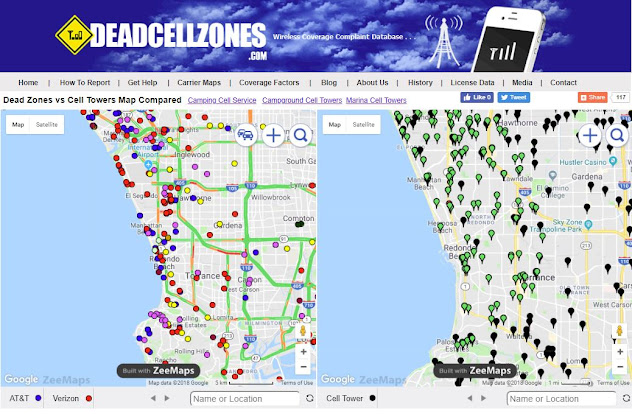
Deadcellzones.com uses public FCC data sources to map cell phone towers and other unregistered antennas (DAS) in the United States.  The cell phone coverage and cell tower map can be found here.  The map on the left shows dead cell zone complaints and the map on the right show cell phone towers and DAS antennas that have been registered and some unregistered antennas.  The green dots are unregistered antennas and the black dots are cell phone towers.  We do not have all registered & unregistered antennas in this map.  If you see a particular area that you would like us to add unregistered cell phone towers please email us.  

Deadcellzones.com Map

We often get emails from real estate agents looking for data to help their clients better understand what cell phone towers exist in the neighborhood near the home.  This is often true of out of state buyers looking at homes who are unfamiliar with the area.   Homebuyers from out of the area often want to know how the cell phone reception is of a particular home or apartment and don't want to be surprised if a cell phone tower or antenna is hanging on a pole near the house. 

Deadcellzones.com is also actively trying to get cell phone reception feedback used by real estate companies like Zillow, RedFin, HomeSnap & Realtor.com.  We think cell reception and cell tower data should be an attribute used by real estate companies similar to how Walkscore provides information about things nearby a home like schools, restaurants, and parks.  

Most real estate companies have been very reluctant to share this data with prospective home buyers for obvious reasons.  Why would any real estate agent want to give a reason NOT to buy a home?  Hopefully, this culture of dishonesty will change in the near future and this data can provide some transparency.  

Some areas in particular where we have a lot of readers are in California.  So if you are looking to find places to live here is one resource that might help when trying to find tiburon apartments

How Well Will the Apple Watch Hold a Cellular Signal?

Apple Watch Antenna is the Screen
Apple Watch Antenna is the Screen Itself

Do you remember how bad the signal was when the first iPhone launched?  That is one of the main reasons why we started Deadcellzones.com.  I would anticipate that the Apple Watch will likely drop more calls than your cell phone due to the smaller antenna.

I am having a serious deja vu, as this reminds me of when the first iPhone launched back in 2007 and our web site traffic on Deadcellzones.com spiked huge for years. As we all know AT&T had nightmares for years after the iPhone launch. Will history repeat itself again?

If you didn't see the recent Apple Event in September of 2017 watch the demonstration of a live call on Lake Tahoe.  Apple executives call this a windy lake and were excited about how clear the call was despite the wind.

We would love your feedback below in the comments as you start using the Apple Watch.  Please compare your signal to you cell phone and see which one holds calls better.

This cellular watch will also create a lot of demand for power and extra battery life.  How long will the batter last?

Apple Watch Demonstration on Lake Tahoe

New Antenna: A Solution For Short Battery Life & Poor Signal

A new digital phone antenna design that is expected to improve reception, data-transfer speed, and power consumption.

A new piece of research could offer welcome news for smartphone users struggling with poor signals, slow downloads, and short battery life.

Researchers at the Radio Science and Engineering Department at Finland's Aalto University have developed a digital antenna design that is expected to improve reception, data-transfer speed, and power consumption.
Currently, smartphones have multiple antennas that each work with one or several frequencies dedicated to specific smartphone applications, such as cellular reception, GPS, and Bluetooth.

The new method is set to change this approach by combining several small antenna elements together as a single aerial, which can be controlled digitally to operate at any frequency.

Viikari compares this approach to a guitar where a single open string could digitally be made to produce a different note. When one compact antenna can be used for multiple frequencies, it frees up space for the likes of larger touchscreens, thanks to smaller bezels, without sacrificing the phone's performance.

But the new digital method promises to give the antenna greater bandwidth, which results in better radiation efficiency and the 100 to 1,000 times faster data transfer speeds set as an objective for the next-generation of 5G smartphones.  Read more

How WiFi Offloading Affects Cellular Leases


Cellular 4G LTE vs WiFi

To cope with the exponential increase in data demand since the introduction of the Smartphone, many wireless carriers have been trying a variety of solutions to help meet the needs of their customers. In some cases, these service providers find themselves with a troubling choice: they can either offload their cellular traffic to public, unlicensed WiFi networks or risk losing customers to their competitors. It is understandable that most would choose the former, but the increasingly widespread practice of WiFi offloading has many cell site owners concerned about the implications. Could this offloading practice take business from cellular providers and site owners, or worse– render them obsolete?

Experts think not. In fact, the practice of WiFi offloading isn’t nearly the threat to cellular service that it might seem at first glance. While there are certainly issues with this practice that will require a bit of patience, flexibility, and extra preparedness from cell site owners and renters, there are still several challenges in the wireless industry that make cellular service a necessity. In fact, issues particular to WiFi capability not only ensure cellular services’ secure position in the wireless data industry, but could also prove a boon to savvier investors.

Meeting Hotspot Requirements

No matter their size, any given WiFi access point will have limitations in both service radius and number of users that can be supported at once. Hence, the growing demand for WiFi hotspots, and the access points available at each, has many wireless carriers scrambling to develop new cellular sites and improve those already in existence. This means more investment opportunities for cell site owners and renters alike.

Even with their best efforts, there are still significant gaps to be found in WiFi coverage, particularly in more rural areas. As a result, customers continue to utilize cellular coverage as a more reliable option. Since WiFi planning and development often take several years to process and implement, cell tower owners in these areas are particularly secure from any threats that could be posed by WiFi offloading.

Interference

On the other side of the coin, more population-dense areas are facing an over-saturation of data access points in WiFi hotspots. This overload of competing access points creates interference between WiFi carriers, which diminishes both security and quality of user experience. In these scenarios, cellular service provides an access point with greater security and protection from interference, enhancing the user experience on all points.

As a result, a large percentage of users continue to rely on cellular coverage even in thriving WiFi hotspots. Those owning or renting cell towers in these areas may do well to upgrade their sites to keep up with evolving WiFi technology, but maintaining the quality of cellular technology on the site will also be crucial to the property’s value.

Meeting the Demands of High Call Volumes

Along with its limitations in terms of radius and user capacity, WiFi also faces challenges in terms of high call volumes. Most WiFi access points can only handle 15 calls simultaneously, and this number decreases in areas of high interference. As long as people continue making voice calls, the need for reliable cellular towers will remain constant. This is especially true in areas that experience higher call volumes, such as neighborhoods rich in multifamily housing and city business districts. 

Ensuring Seamless Connectivity

Currently, most WiFi access points require users to sign in at least once to be able to use the network. This inconvenience is strongly felt by those in transit, in the midst of a conference, or for those handling time-sensitive matters over the network. As such, most users opt for cellular service for hassle-free access to their data network. While steps are being taken to make WiFi access a smoother process for users, it will require protocol development and technological updates that will take several years to implement. The process will also require additional partnership and cooperation with cellular service providers, creating a potential benefaction for cell tower owners.

Maintaining Continued Security in a Changing Industry

With WiFi service providers facing challenges that only cellular providers can overcome, cell tower owners can take assurance that their property is certain to maintain its value in the years to come. However, there are steps that cell site owners and renters can take to not only ensure this security’s longevity but to increase property value in the interim. By practicing savviness and adaptability, cell site owners can ensure the continued worth of their investment for many years to come. The consultants at Lease Advisors are prepared for such contingencies and are ready to help cell tower owners make the most of the changing times. By offering their expertise and insight, they can help turn this potentially worrying trend into a long-lasting advantage for you and your investment.

Top 10 Cell Phone Reception Issues

What is more annoying than not being able to reach someone on their cell phone? Dropped calls, dead zones, and network congestion. This is such an important issue and some speculate the coverage has actually gotten worse over the last few years as smartphones start to dominate the network traffic. Leading industry analysts and wireless carriers keep statistics on this matter. Change Wave Research, a leading industry research company in the wireless sector, found that AT&T was the leader in this wireless category with approximately 4.5% of dropped calls in January 2010. We don’t necessarily believe this extent of this recently published research due to AT&T’s network problems and expect to see some more research on this topic in the weeks to come. So, if this so important, what are the top 10 cell phone reception issues?
  1. Network coverage. In the US, there are 4 major mobile telecom service providers and approximately 200 regional wireless telecom providers: AT&T Wireless, Verizon Wireless, Sprint, and T- Mobile. One of the main competitive advantages of being a large mobile service provider is to have nationwide network coverage. Recently, Verizon Wireless claimed to have better 3G network coverage and AT&T Wireless, but this is a bit misleading due to the fact that 3G coverage means data coverage. Voice traffic is still predominantly carried over the 2G networks. So, if the wireless carrier does not have adequate coverage in your area, it could be a leading factor in your cell phone reception issue.
  2. Cell site capacity. Another issue is contributed by the channel capacity of carrier cell towers. Most cell sites can handle a finite number of simultaneous users. Cell towers can typically handle up to 500 simultaneous voice users at once while drastically less and only about 50 data users. Once this capacity has been reached, the base station controller (BSC) rejects the calls or data connection which ends up dropping those calls. You may often see full bars on your phone which is a good indicator of network congestion. This finite capacity is calculated based on Erlang calculations.
  3. Geographic topology. Sometimes, the wireless signal can get “bounced” due to geographic constraints such as water, buildings, hills, and trees. The wireless signal gets dissipated and lost which minimizes the optimal connection.
  4. Cell phone antenna issues. Most cell phones these days have an internal antenna for reception and communication. Therefore, the size of the antenna is restricted by the form factor of each cell phone.
  5. Human interference with cell phone antenna. This is the most recognized issue especially with the gaffe by Apple and their most recent iPhone 4G. Due to the fact that the hand placement on the antenna can dissipate the signal, the cell phone would lose the wireless connection. Simple guards such as “bumpers” or cell phone cases can minimize this issue.
  6. Signal handoff. Due to the mobility nature of cell phones, sometimes the handoff of signal from one cell tower to another gets mixed up due to signal dissipation and network errors. Most of the time, people experience this while they are driving.
  7. Roaming authentication. Although most of the coverage purported by the carriers appears to be their own network, some of the coverage is offered by other network operators in strategic alliance with the major carriers. These relationships are known as roaming partnerships. Sometimes, the visitor location register (VLR) does not sync with the home location register of the carrier’s back-office which does not complete the settlement between the two operators. Today, most of this is masked due to the elimination of roaming charges to the end-users with the carriers simply rolling in this roaming usage into one voice plan.
  8. Long-distance handoff issues. Cell phone users take for granted that they can make long-distance calls outside of their toll area since it is rolled into their voice plans. However, when there is a communication error from the Long Distance provider and the carrier’s network, the call cannot go through.
  9. Network outage. Sometimes, the weather has an impact on the telecom network. When the cell tower loses power to access, the signal is lost for a short duration.
  10. Building penetration. When you are indoors, there are times that you will lose your cell phone reception.  This is due to the signal dissipation through the concrete as well as through other materials. Some building owners implement cell phone repeaters (picocells) to help improve this issue.
So, even though these are the majority of the factors that could hamper cell phone connectivity, sometimes, you just have to check to see if you have your antenna operating on your device before you can blame the carriers.

Author: John Shin is a featured writer at a new ask an expert site. Visit Yoexpert.com for more info.

Popular Posts