Showing posts with label Cell Reception. Show all posts

How to Extend iPhone Battery Life & Signal

signal booster

Your iPhone is one of the most important tools you use every day, but nothing is more frustrating than running out of battery or losing signal when you need it most. While Apple continuously improves hardware and software, users can still face challenges with battery drain and weak reception. The good news is that there are many practical strategies to extend your iPhone’s battery life and improve its signal strength. This article covers the best methods, from built-in settings to lifestyle changes and accessories, so you can get the most out of your device.

Why Battery Life and Signal Go Hand-in-Hand

Most people don’t realize that poor reception can directly impact battery life. When your iPhone struggles to maintain a cellular signal, it uses more power to stay connected to the network. Similarly, background processes, app refreshes, and constant notifications can drain the battery unnecessarily. Understanding this relationship helps explain why optimizing both battery life and signal strength leads to better performance overall.

1. Adjust Screen Brightness and Display Settings

The iPhone’s display is one of the biggest battery consumers. Lowering brightness or enabling auto-brightness can save significant energy. You can also enable Dark Mode, which reduces power consumption on OLED screens by using darker pixels. Reducing the auto-lock time ensures your screen doesn’t stay on longer than necessary. Small tweaks to display settings can extend daily usage without affecting your experience.

2. Manage Background App Refresh

Background App Refresh allows apps to update content even when you’re not using them, but it consumes both data and power. Go to Settings > General > Background App Refresh and turn it off completely or restrict it to Wi-Fi only. Limiting this feature prevents unnecessary updates, preserves battery life, and reduces background signal usage.

3. Use Low Power Mode

Apple’s built-in Low Power Mode is designed to extend battery life when your charge drops below 20%, but you can activate it anytime for better efficiency. This feature reduces background activity, mail fetch, automatic downloads, and some visual effects. For people on the go, keeping Low Power Mode on during travel days or long commutes can make a noticeable difference in how long the phone lasts.

4. Update iOS Regularly

Each iOS update often includes performance and efficiency improvements. Outdated software may drain battery faster or handle signals less efficiently. Always keep your iPhone updated to the latest version of iOS. You can enable automatic updates under Settings > General > Software Update. Staying current ensures you benefit from Apple’s battery optimizations and bug fixes.

5. Turn Off Location Services When Not Needed

Location tracking is another heavy drain on your iPhone. Many apps request location access even when it’s unnecessary. Go to Settings > Privacy > Location Services and review which apps have access. Set most apps to “While Using” instead of “Always” to prevent constant GPS usage. This adjustment saves power while maintaining functionality for apps that truly need location data.

6. Limit Push Notifications

Push notifications keep you connected, but they also force your iPhone to wake up frequently, draining battery and requiring network access. Disable unnecessary notifications in Settings > Notifications. Grouping notifications and limiting them to essentials like messaging and calendar alerts can reduce interruptions, save power, and improve signal efficiency.

7. Switch Between Wi-Fi and Cellular Strategically

Your iPhone often uses more power when searching for cellular signals in weak coverage areas. If Wi-Fi is available, connect to it, as it consumes less battery. Conversely, if the Wi-Fi connection is poor, turning it off prevents your phone from constantly switching between Wi-Fi and cellular. Being mindful of when to use each connection helps extend both battery life and signal stability.

8. Optimize Signal Strength

Signal strength plays a major role in both connectivity and battery performance. If you’re in an area with weak reception, your iPhone works harder to stay connected. To improve signal:

  • Move closer to a window or higher floor in a building.

  • Avoid thick walls, elevators, or basements that block signals.

  • Use Wi-Fi calling when cellular strength is low.

  • Consider a signal booster if you live in an area with consistently poor reception.
    By improving reception, you reduce the workload on your iPhone and conserve battery power.

9. Disable Unnecessary Wireless Features

Features like Bluetooth, AirDrop, and Hotspot are convenient but consume energy even when not in use. Turn them off from Control Center when you don’t need them. Similarly, AirPlay scanning and background Wi-Fi activity can drain battery if left running. Minimizing unused wireless functions helps your iPhone run more efficiently.

10. Manage App Usage and Close High-Drain Apps

Some apps are notorious for consuming battery, especially social media and streaming platforms. You can check battery usage in Settings > Battery to identify which apps are using the most power. Closing high-drain apps or limiting their screen time helps conserve energy. For navigation apps that require constant GPS, consider downloading offline maps to reduce both data and battery drain.

11. Enable Airplane Mode in Dead Zones

When you’re in an area with no service, your iPhone continuously searches for a signal, which quickly drains the battery. Turning on Airplane Mode prevents this constant searching. You can still enable Wi-Fi or Bluetooth manually if needed. This tip is particularly useful during flights, rural travel, or underground commutes where signal is unreliable.

12. Use Optimized Battery Charging

Apple’s Optimized Battery Charging feature extends battery health over the long term. Found in Settings > Battery > Battery Health & Charging, this feature learns your charging routine and reduces wear by limiting charge beyond 80% until you need it. Maintaining long-term battery health ensures your iPhone continues to hold a strong charge for years.

13. Invest in Accessories for Better Performance

Sometimes hardware solutions are the best answer. A portable power bank can keep your iPhone charged during long days without outlets. External signal boosters or case-integrated antennas can help in low-coverage areas. Quality charging cables and adapters ensure efficient charging, which reduces battery stress over time. While accessories cost extra, they provide reliable solutions for extending both battery and signal.

14. Restart Regularly and Reset Settings if Needed

Restarting your iPhone once a week clears memory, closes lingering processes, and refreshes connections. If you experience persistent signal or battery issues, resetting network settings can help. Go to Settings > General > Reset > Reset Network Settings to clear outdated connections. This often improves both connectivity and efficiency without erasing personal data.

Common Mistakes to Avoid

Many users unintentionally reduce battery life and signal quality. Avoid overcharging your iPhone overnight, as constant high-voltage charging generates heat. Don’t use cheap charging accessories, which can damage the battery. Similarly, avoid placing your phone in tight pockets or bags with metal objects, as this can weaken signal reception. By steering clear of these mistakes, you prolong both performance and device health.

Conclusion

Extending your iPhone’s battery life and improving signal strength is possible with a mix of smart settings adjustments, mindful usage, and occasional hardware support. From managing background activity and optimizing display brightness to improving signal with boosters or Wi-Fi calling, small changes add up to big improvements. By following these strategies, you can enjoy a longer-lasting iPhone that keeps you connected when it matters most. A well-optimized device not only saves time and frustration but also extends the overall lifespan of your phone, ensuring it remains a dependable companion in your daily life.

Managing Cell Phone Reception During a Hurricane: Essential Tips

In an age where cell phones have become indispensable tools for communication, staying connected during a hurricane is of utmost importance. Hurricanes often disrupt traditional communication channels, making cell phones a vital lifeline. However, managing cell phone coverage during such extreme weather conditions can be challenging. In this article, we'll delve into practical strategies to help you stay connected and informed when it matters most.  Get live updates on Hurricane Idalia. 

How Does Our "Worst Cell Phone Coverage" Page Fall From Top 10 to Top 60 in 1 day?

Verizon is evil logo

"Worst Cell Phone Coverage" Google Search Console

We have always been suspicious of Verizon and its marketing tactics over the last 2 decades and I am even more suspicious of them now.  Here is why . . . 

Verizon Wireless recently overtook AT&T Wireless as having the most cell phone coverage complaints in our dead cell zones database.  AT&T for the longest time has had the most complaints.  However, I have noticed a huge difference in Verizon's network performance lately and think there is a lot more parody among the carriers depending on where you are.  Verizon doesn't have the best coverage anymore in our opinion and the database based on complaints confirms this.  

Here is a map below that shows you the count of complaints in our database and Verizon now leads the pack.  This doesn't surprise me as Verizon has always been arrogant about its marketing and claims.   I recently have had several horrendous customer service experiences with them as well.  

Verizon worst cell coverage map
Search engine optimization is now a huge game in that these carriers invest millions of dollars per year to try and squash competitors and negative press.  Verizon has hundreds of people on staff that look at websites like ours to try and discredit the validity of the content using dirty SEO tactics.  

Our page "Worst Cell Phone Coverage" had been getting a ton of traction with Google and huge engagement in searches recently largely because consumers know they are getting screwed by many carriers in certain places.  Why would this page suddenly fall out of the top 10 and move to 50+.  The result is this page doesn't perform anymore for some reason.  Did someone file false claims on the page to Google?  I am very suspicious and would like to get to the bottom of it.  Why would a perfectly fine page fall out of the top 10 so suddenly?   We have changed nothing on this page recently. 

Worst Cell Phone Coverage


How To Find 5G Cell Towers Near You

5G signal 5 bars iphone

5G wireless networks are pretty much in every major city throughout the United States and World.  More cell towers are being upgraded from 3G and 4G every day to 5G. If you want to get specific 5G coverage, you'll need to find particular towers that are 5G. These towers aren't available everywhere, so you might be wondering if one has been built near your home. If a 5G tower is nearby and your devices are 5G-capable, you can expect quicker data downloads and other performance benefits.  On newer iPhone and Android 5G models, the signal bars will indicate 5G. 

Consult your carrier's 5G coverage map to find out where its 5G networks and towers are located. Simply use the links above to access carrier coverage maps and search for 5G coverage.

When it comes to cell reception, location matters regardless of which smartphone you choose or which carrier you use.  It can be difficult to receive a strong enough signal to handle voice and data capabilities on your phone when you're too far away from your carrier's tower. Whether you're not getting the signal you're looking for, check to see if there's a cell phone tower nearby.

It doesn't have to be difficult to locate the nearest cell phone tower in your neighborhood, in your rural house, or even on the go. It all starts with familiarizing yourself with several websites for locating cell towers that are both beneficial and simple to use.

See our map of cell phone towers below.  If we are missing a location please add it to the map.  We also have another map where you can find 5G cell towers near you and dead zones. 

How Far Can You Be From A Cell Tower & Still Have A Signal?

Cell phones rely on tower signals to function. The closer you are to the tower, the stronger and less distorted your signal will be, resulting in a better voice and internet connection. To obtain a decent signal, you don't have to reside exactly near to a cell phone tower.

Some cell phones can receive a signal from a tower up to 45 miles away, you won't always obtain a usable signal from that distance. The environment, buildings, and other impediments might limit a signal's efficacy over distance, making it too weak to do any good once it reaches your phone. In some cases, the network's technology or other factors may limit how far the signal travels.

Simple Ways to Find Cell Towers Near You

Nothing is more useful or intuitive than a cell phone tower map for determining the position of the nearest mobile tower and the direction your signal is coming from.

You may enter some basic information and get a map of cell towers in your area on a variety of websites. To utilize the maps, you'll need to find known landmarks and main roads to figure out where you are in relation to various cell towers, but that's no different than using Google Maps to find the closest places. You won't obtain a street address, but you should be able to figure out whether there are any functioning cell phone towers nearby.

Because of its user-friendly layout and several filtering options, this cell tower locator is our favorite. Before looking for towers near your address or location, CellMapper allows you to filter by provider and service type. To use it, scroll through to pick your nation, select your mobile provider, network speed, then enter an address or zip code to view the nearest cell towers instantly.

Check Coverage Map By Address of Your Cell Phone Service Provider

Your provider might be able to tell you where cell phone towers are located, or at least where coverage is expected to be available. These maps can show you if your location isn't covered and you're not receiving a decent signal. As you might expect, each of the main telecom carriers has its own interactive coverage maps available online.

Instead of presenting cell phone tower sites, Verizon provides a color-coded coverage map to help you figure out if you're supposed to get service in a particular area. Based on the mapping address you typed into the search bar, it tells you what kind of coverage and signal quality you may expect (e.g. 4G LTE Quality: Excellent).

AT&T has a comparable map that shows approximate wireless voice availability, including third-party coverage, for your mapped address. You may get even more information by zooming in on specific spots. You can also look for information based on your present location. On the map, different forms of coverage are color-coded.

T-Mobile's map lets you compare your address's coverage and signal strength to what you'd get from the other major providers. They also feature a cell tower search tool that allows you to enter your address and find the closest cell tower. Despite the fact that Sprint is now a part of T-Mobile, it still has its own coverage map.

Use An iPhone or Android App to Locate a Tower

On smartphones, you may also download mobile phone tower location apps. This allows you to find a cell tower near you no matter where you are, which is useful for frequent travelers. Consider downloading a cell tower finder app if you need a quick resource for discovering cell phone towers near your home. Whatever you're looking for in a cell tower finder app, chances are you'll find it on the App Store or Google Play.    

Living Near Cell Towers Dangerous?

When it comes to cell phone towers, how near is too close? According to numerous stories, living too close to a cell tower can be dangerous, and many people are particularly scared about 5G towers.  The jury is still out and deliberating what the long-term effects might be living close to a tower. 

Many companies offer outdated maps of where cell phone towers are located.  However, wireless carriers are adding more DAS networks than cell phone towers these days.  Learn more about the difference between cell phone towers vs DAS. 

If you think it is dangerous to live near 5G cell phone towers use this map to find locations of 5G dead zones contributed by our users. 

Related Articles: 

Which Types Of Mobile Games Will 5G Coverage Benefit?

How to Fix Your Apartment Cell Phone Dead Zone

apartment cell coverage

If you're experiencing a cell phone dead zone specifically in your apartment, here are some steps you can take to try and improve the situation:

What Causes Poor Cell Phone Reception?

reasons for poor indoor cell reception

The Main Causes Of Poor Cell Phone Reception

There is nothing worse than moving to a new place only to discover you only have one single bar of cell phone coverage. You’re not getting any signal, your calls get dropped or simply don’t come through, downloads are achingly slow, all the meanwhile you’re busy handing over your hard-earned money to pay your monthly cell phone bill. If you’re thinking about moving your home or office to a new location, cell phone coverage may be something you want to check out before you do.

Here are some of the main causes of poor cell phone reception:

Several factors come into play when it comes to cell phone reception. While some of these factors, like weather, can cause intermittent issues with coverage, others will consistently affect coverage. One of the main factors is the distance of your home from a cell phone tower, and what topographical challenges lie in between such as forests, hills, mountains, and valleys. Obviously, the more rural the area is the less likely you are to get great coverage but even in cities, other buildings, or trees can also block coverage. The construction material of your home or office will also come into play with certain materials like brick, metal and super thick walls hampering cell coverage as well.

In cities, congested towers can also cause poor cell phone coverage as many users try and access the tower at one time. It’s worth looking into the number of towers in your specific area as well as plans for new towers, particularly if you are in a developing area where the population is due to increase in the future.

What can you do about poor cell phone coverage

If you’ve already made the move only to discover that the cell phone coverage isn’t living up to your expectations, there are a few things you can do. While you could wait for your network provider to magically solve all of your issues, this could be a long and very frustrating process. Another option is to invest in a cell phone signal booster.

Cell phone signal boosters work just as the name sounds – they help to boost weak cell phone signals. You can get cell phone signal boosters for your home, car, RV or even your boat. Also known as an amplifier or repeater, these devices use an antenna to receive and transmit signals at an increased level of power and sensitivity than you would get merely by using your device by itself.

Cell phone signal boosters can work even in the most remote of places so you can access real money pokies wherever you go. They amplify the signal and cut out the connectivity issues caused by natural obstructions and distance. The use of a booster can help make your calls clearer, allow for faster internet browsing and ensure that a call is never dropped again. A boosted connection can also help improve your cell phone’s battery life as your phone doesn’t waste power and energy on a constant search for a stronger signal.

Google Releases New Peer-to-Peer WiFi Direct App

WiFi Direct

Google has launched an exciting Wi-Fi application that will not provide any useful features. The move, however, is part of a larger strategy by Google, which is working on bringing a variety of new wireless capabilities to phones that do not require an active internet connection. The new Wi-Fi features could be used in the same way that Bluetooth does, with the added benefit of being able to communicate over much longer distances.

The new Google app, dubbed WifiNanScan, is available for download from the Google Play store and is aimed at developers who want to work on Wi-Fi Aware apps.

The Wi-Fi Aware protocol (also known as Neighborhood Aware Networking (NAN)) is used by the WifiNanScan app to measure the distance between two smartphones. It's intended for use by developers, manufacturers, universities, and others as a research, demonstration, and testing tool. With this app, you can measure distances with an accuracy of about 1 meter between phones that are up to 15 meters apart. This tool can be used by developers, OEMs, and researchers to validate distance/range measurements, allowing for the development of peer-to-peer ranging and data transfer, find my phone, and context-aware applications using the WiFi Aware/NAN API. (WifiRttScan is another option.)

According to 9to5Google, Wi-Fi Aware is also known as Neighbor Awareness Networking (NAN). Wi-Fi Aware apps, which allow smartphones and other gadgets to discover and communicate wirelessly, would be able to run on devices running Android 8.0 or higher. The devices would be directly connected to each other, without the need for a Wi-Fi network or any other type of internet or GPS connection.

Wi-Fi Aware devices would be able to "share large quantities of data" and send short messages. According to Google, the technology allows for “higher throughput rates over longer distances than Bluetooth connections.”

Wi-Fi Aware has a variety of use cases, according to the Wi-Fi Alliance, ranging from simple things like communicating with people nearby to play games to more complex things like finding friends at a concert without using GPS. More advanced enterprise uses would be supported by the functionality, such as securely connecting to a printer without logging onto the network or making restaurant reservations by walking nearby, even when the restaurant is closed. Other situations include automating and timestamping school check-ins and roll-calls, as well as streamlining airport security processes by using a digital ID that can be sent wirelessly to authorities. Wi-Fi Aware can even help advance autonomous vehicle technology. It could “enable autonomous and remote-controlled vehicles to instantly become aware of other devices and automatically exchange information like GPS coordinates, altitude, direction, and owner ID,” according to the researchers.

Until then, Google will need to enlist the assistance of developers, which apps like WifiNanScan can do. The app has a lot less features than the previous examples. Wi-Fi is used by the app to accurately measure the distance between two phones. Google explains, "With this app, you can get a distance measurement with an accuracy of about 1 meter with phones up to 15 meters apart." “Using the WiFi Aware/NAN API, developers, OEMs, and researchers can validate distance/range measurements, enabling the development of peer-to-peer ranging and data transfer, find my phone, and context-aware applications.”

WifiRttScan, a similar app for indoor positioning, was released a few years ago. Instead of using GPS to locate users, the app uses Wi-Fi Round Trip Time.

In the future, Google may combine these Wi-Fi experiments to develop new functionalities for phones and other smart devices based on Wi-Fi Aware wireless connectivity standards.

For developers, manufacturers, universities, and others, the WifiRttScan app is a research, demonstration, and testing tool. With this app, you can get a range accuracy of 1-2 meters to nearby WiFi-RTT (802.11mc) capable access points. This is particularly helpful when there is no GPS signal. This tool can be used by developers, OEMs, and researchers to validate range measurements, allowing for the development of positioning, navigation, and context-aware applications using the WiFi-RTT API.

One important future application of this could also be connected cars!!!  

Buying a Home Next to a DAS Antenna or Cell Tower

Antenna on Utility Pole Next To Homes

If you are buying a home these days you should probably do your due diligence on cell phone towers and DAS antennas that are within a few blocks of your home.   

One of the biggest concerns of a prospective home buyer today is the cell phone reception quality of a home.  Will my new home get a good cell phone signal?  However, most people don't often think of living too close to a DAS antenna on a utility pole (picture above) or a cell phone tower being in their backyard (below).  Here are some articles on cell tower health and safety issues.  Another concern is property values declining near cell phone towers.  

Cell Tower in Back of Home

It is not always transparent if you are new to a neighborhood if there have been historic health and safety issues from a cell phone tower or DAS antenna nearby.  In fact, cell phone companies have dozens of local public relations people on staff to keep the surrounding communities appeased by donating to charities and sponsoring local events.  Public relations is a huge part of trying to squash any negative press or city council issues about putting up new cell phone towers and potential safety issues.  

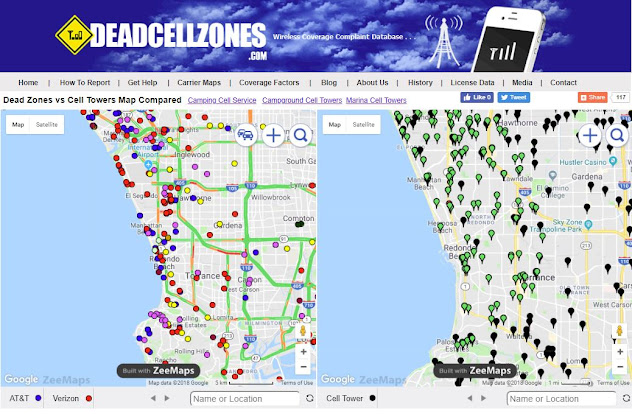
Deadcellzones.com uses public FCC data sources to map cell phone towers and other unregistered antennas (DAS) in the United States.  The cell phone coverage and cell tower map can be found here.  The map on the left shows dead cell zone complaints and the map on the right show cell phone towers and DAS antennas that have been registered and some unregistered antennas.  The green dots are unregistered antennas and the black dots are cell phone towers.  We do not have all registered & unregistered antennas in this map.  If you see a particular area that you would like us to add unregistered cell phone towers please email us.  

Deadcellzones.com Map

We often get emails from real estate agents looking for data to help their clients better understand what cell phone towers exist in the neighborhood near the home.  This is often true of out of state buyers looking at homes who are unfamiliar with the area.   Homebuyers from out of the area often want to know how the cell phone reception is of a particular home or apartment and don't want to be surprised if a cell phone tower or antenna is hanging on a pole near the house. 

Deadcellzones.com is also actively trying to get cell phone reception feedback used by real estate companies like Zillow, RedFin, HomeSnap & Realtor.com.  We think cell reception and cell tower data should be an attribute used by real estate companies similar to how Walkscore provides information about things nearby a home like schools, restaurants, and parks.  

Most real estate companies have been very reluctant to share this data with prospective home buyers for obvious reasons.  Why would any real estate agent want to give a reason NOT to buy a home?  Hopefully, this culture of dishonesty will change in the near future and this data can provide some transparency.  

Some areas in particular where we have a lot of readers are in California.  So if you are looking to find places to live here is one resource that might help when trying to find tiburon apartments. 

Does The Sensorly App Drain Your Battery?

Sensorly App Screen Shot & Users

Do any of our readers use the Sensorly, OpenSignal, MyMobileCoverage or Rootmetrics signal measure apps the run in the background on a regular basis? I have been reading some blog posts that indicate that these apps drain the battery.  Would love your feedback on the added benefit if you like it or not?

Apparently they have getting a lot of user feedback and have updated the app. Here’s what you can expect in the newly updated Sensorly 3.9.6: On the Sensorly blog post they stated the following.

- Added Refresh Map Cache button to the settings page
- Fixed bug caused by switching networks on the map
- Tweaked max battery settings
- Fixed issue with the periodic wake timer resetting
- Improved Battery life

"User feedback centered around two main aspects of the app: battery life and the map. Some devices were not displaying mapped coverage and speed tests correctly, so we added a clear cache setting to reload map data and address this issue. Other map related changes will ensure that all map buttons function properly. We’re confident that these changes will provide a better overall map experience to our community."

"The team also made improvements to help optimize battery life, including making sure that maximum battery discharge for passive mapping keeps values set by the user. Changes to the way Sensorly performs check-ins and background tasks were also tweaked to aid battery longevity."


How to Search Dead Zones Database Map

Word Cloud of Dead Cell Zones Database 
You can search for these locations on the dead zones map. 
See the map below for directions. 


What Would You Rather Have: Portable Emergency Cell Tower or Defibrillator?

AT&T's Network Is Known To Cause Heart Attacks! 
AT&T (NYSE: T) made a product announcement yesterday to start selling a portable cell tower in a suitcase.  You have to laugh when you see the product because you are more likely to die of a heart attack trying to connect to the network in an emergency.  The emergency cell tower is designed to be used and deployed in a disaster scenario when there is no cellular service.  However, you are more likely to die of a heart attack being stuck in a dead zone before you are able to set up your emergency cell tower to get coverage.   This product is so dumb that you know the US Government will by buying these things in droves because AT&T will be terrifying officials with fear.  I have an idea . . . How about using some of the emergency funds to fix the cell coverage dead zones you already have?    If spectrum were more open in rural areas the private sector could solve the coverage issues themselves with products like: Solar Powered Remote Cell Towers. 

This begs the question why are they offering this if their cellular network covers 98% of the population?  This portable cell tower only covers a 1/2 mile radius and it is way overpriced. Who or what company is going to buy this for $15,000 - $45,000 depending on options?  Who is going to spend 30 minutes trying to set this up in the middle of a disaster?  How can they possibly have enough of these portable towers in place to repair their broken network when it inevitably crashes?  

Related Stories:
 

Dead Cell Zones Location Database Growth Since 2000


Here is a chart graph showing our dead zone database growth and current active locations in red over the last 14 years.  We have had over 120,000 complaints submitted to our map.  We try and remove older locations and remove locations that were submitted prior to 3 or 4 years ago.

Carriers tend to upgrade networks and fix dead zones but this does not always fix the problem.  Carriers can also create new dead zones while upgrading networks depending on how new your phone is.  For example, many customers who once had good 2G coverage may no longer have coverage if 4G LTE as been upgrade on this tower.   

Cell Boosters: A Solution for Poor Cell Signals


Wherever there are dead cell zones, dropped calls, static during calls and generally, bad reception is bound to follow. Cell phone users that live in an area where there is not even one bar of reception anywhere in their vicinity will have a hard time rectifying their situation without a provider’s solution. However, for those that can pick up even one bar of reception, a cell booster is a very affordable solution to improve cellular signal reception.

In the simplest terms, cell boosters take weak cellular signals and amplify them within a home, office, or building. A typical cell booster kit includes an external antenna (for picking up weak signals), an amplifier (for boosting weak signal), and an internal antenna (for rebroadcasting the amplified signals). But how does one go about selecting the best cell booster?

There are a couple of things to keep in mind when shopping for a booster: application and frequency. There is a difference between a small home cellular repeater and one designed for a warehouse. Large, multi-story buildings or spaces larger than 30,000 square feet often require custom cell booster installation and the expertise of a specialist.

However, for smaller cell booster applications, the most important thing to take note of is frequency. Amplifiers operate on different frequencies including 800 MHz (Verizon, US Cellular, and Alltel), 1900 MHz (T-mobile, Sprint and Metro PCS), and iDEN (Nextel). For those that aren’t sure what frequency their carrier utilizes, a Dual Band booster is probably the best choice. These amplifiers operate on both the 800 MHz and 1900 MHz bands, covering most carriers (with the exception of Nextel).

Basic cell boosters typically fall into the $200 -$250 price range and can be installed with minimal technical assistance.

Best and Worst Mobile Reception


We are living in an era where instant communication is everything. Having a decent cell reception has become an important criterion for people selecting an area to live in. The general expectation is that we would get cellular reception in all areas, but this isn’t the case as a recent study has conducted by SmartPlanet has identified the top 10 worst cities for signal reception in the U.S.

The Best Reception Areas

In terms of the best signal reception, New York tops the list. The reason is that adequate numbers of cellular towers are in place to match the growing population. New York is followed closely by Chicago and then Los Angeles. The correlation over here is that cities that have developed in terms of technology and other indicators have decent signal reception. Other top reception areas include Memphis, Houston, Philadelphia, San Diego and Phoenix.

Worst Areas

In terms of the worst areas for signal reception, we have Bakersfield, Colorado Springs, Oklahoma City, Lincoln, Toledo, Tucson and Milwaukee among the main ones. Detroit also falls in the top ten lists and may come as a surprise for some, but the thing is that the overall building architecture in the city is such that signals drop easily, especially with a lot of skyscrapers that come in the way of signals.

Bakersfield and Signal Reception

Bakersfield, California tops the list of worst signal reception in the U.S. Most of this can be attributed to the increase in the population and inadequate signal towers. The increase in population is identified as a major factor since Bakersfield has one of the highest population blooms in the U.S. Its population increased by forty percent during the 2000-2011 time periods.

Another slightly related issue is that of bill recovery in Bakersfield that discourages carriers from expanding more. Our mobile phone bills are usually billed on a monthly account and with the recession hit reduced income that could pose a problem. The bill also includes those for home phone and internet services as well. Your debt may keep piling up in this regard, and then there is the obligation to save too. So you are left with the question of should I save money or pay off debt?

There is no single answer to this. It depends on the individual's preferences as the area doesn't seem to be getting good reception any time soon as fiscal recovery is the top priority for now. It's also tied into the issue of settling credit card debt.

The best carrier that has been identified in the area is Sprint whereas the worst is AT&T. Majority of the population is using AT&T preferably because of the cost-effective nature, but this had a heavy toll on the overall signal reception in the area.

How to overcome

The best bet for an immediate measure would be to revert to the best carrier in the area. There’s also the possibility of using boosters as is being done in the case of Wi-Fi signals. Things are going to improve for Bakersfield in the coming few years since there has been oil drilling activity initiated this year. This would bode well for the economy in terms of job creation. Furthermore, a hidden benefit, in this case, would be better facilities like signal reception.

There has also been talking of microcells being used to boost signals. They are available by the name of Femtocell and are being provided by some cellular carriers. This particular device can be said to be a mini router and can be installed in your home/apartment/office. It would boost your cell phone reception. People who have used it along with AT&T have found the results to be good. This can be used as a relevant tool for solving the issue of poor reception.

Why Does Your Phone Signal Fluctuate Standing Still?

cell phone full bars and one bar of coverage
The influx of smartphones and tablets accessing video and pictures has increased the amount of data flowing across cell phone networks.  Cell phone towers can only hold so many more concurrent phone calls or users accessing video or data.  Cell towers can typically handle up to 500 simultaneous voice users at once while drastically less and only about 50 data users. Once this capacity has been reached, the cell tower rejects the calls or data connection which ends up dropping those calls.  You may even see full bars on your phone which is a good indicator of network congestion.

This is why it's usually impossible to get good data access inside stadiums during games with thousands of people clogging the network. This theory of network data congestion holds true with too many people accessing data on the same cell tower.  Everyone is competing for the same access on the cell phone tower and the tower only has so much capacity.  The more people accessing data on a cell tower, the weaker the signal. You might notice the strength of your cell signal in a certain area change depending upon the time of day because of rush hour or you are near a heavily populated area.

The number of simultaneous callers on a single tower was the primary cause for dropped calls years ago.  However, smartphones and their ability to view and stream data can put considerable strain on tower data and voice backhaul. All these factors cause the cell tower cell signal strength to constantly change or breathe.

This is one of the main reasons why many Verizon customers have suddenly started experiencing a lack of coverage in areas that they previously had 3, 4, or 5 bars of signal strength.  Coverage is not guaranteed and coverage maps don't really mean much these days.  It's up to you to submit your coverage complaints to our map where you experience frequent poor coverage.  Deadcellzones.com seems to be the only service that is trying to hold carriers accountable for coverage the promise in areas.  

Great Smoky Mountains National Park Cell Reception


With more than 800 miles of protected trails the Great Smokey Mountains National Park is a natural wonder hosting nearly 10 million hikers and vacationers last year. Don't count on your phone working working in the area. Some have reported reception in the city of Townsend but anywhere toward a hill or mountain it was non-existant. In Wears Valley if you're high enough on a hill you might get a faint signal. What carrier works best in the area? Feedback is appreciated below and feel free to submit your dead zones directly on this map below after typing in Smokey Mountains National Park into the search menu. Some cell phones like Verizon make work better in the town areas, but do not work much at all inside the National Park. Do not depend on a cell phone if you may need 911 help.

Great Smokey Mountains Reported Cell Phone Dead Zones

How Many AT&T Microcells Have Been Sold?

In just 2 years AT&T now has 350,000 Microcells on their network compared to 256,000 cell phone towers.   Sprint has 250,000 femtocells on their network as well.  Microcells are growing a lot faster than cell phone towers despite the poor reviews from customers.  Many AT&T customers experience the Microcell dropping calls which is distributed by Cisco (Nasdaq: CSCO) & designed by IP Access.  Microcells sell for $150-$200, however, many people are learning how to complain to AT&T and get a free Microcell. 

It is also going to be interesting to see how the T-Mobile customers will be affected by the merger and the change in culture towards femtocells.  T-Mobile does not believe in the femtocell concept and has stuck with WiFi calling which works great.  T-Mobile has always maintained the position that they will have their customers use WiFi to make phone calls onto the network when cellular reception is non-existent.  

AT&T has 256,000 traditional cell phone towers which AT&T claims to have and says is growing to 500,000 but I don't believe them.  This would only happen if they would acquire T-Mobile and thus would be many overlapping sites.  AT&T would likely divest many of these towers in the process.  So why all the hype about 4G infrastructure when connectivity is getting fragmented onto WiFi?  Why are carriers hyping 4G  when G still stinks and that WiFi is not secure and therefore you should always connect through their network?  The costs of a Microcell vs Cell Phone Tower makes you think that there could be other alternative forms of unlicensed communication in the future through WiFi for free. 

10 Creative Ways to Fix an iPhone 4 Antenna

iPhone 4 with Landline Phone

iPhone 4 Livestrong Wristband Bumper

iPhone 4 Cutout Wristband Bumper
iPhone 4 Cork Case

iPhone 4 Wood Case

iPhone 4 Carbon Bumper

iPhone 4 Steal Case

iPhone 4 Diamond Bumper

iPhone 4 Gold Bumper
Get Ripped off for $29.95 by Apple when it should be FREE

The media has made a very big deal about the iPhone 4's antenna problems and whether or not a bare-handed grip will cause signal bars to drop. Even if you are the type of person who normally doesn't consider a case for your iPhone, reading all of the reports might give you second thoughts. Here are 10 expensive, free and creative ways that are different from the traditional leather and plastic cases to fix the iPhone 4 external antenna problem. The Apple Bumpers come in six colors for $29 each. Rip-off or not it should be give away for free. 

Popular Posts