Showing posts sorted by relevance for query reviews. Sort by date Show all posts

How Recreation.gov Seeks Cell Phone Service Reviews at Campgrounds

Recreation.gov Seeks Cell Phone Service Reviews

Embarking on a camping adventure is a delightful way to reconnect with nature and escape the hustle and bustle of modern life. However, as technology continues to be an integral part of our lives, staying connected during camping trips has become essential for many outdoor enthusiasts. Recognizing this need, Recreation.gov, the go-to platform for discovering and reserving federal recreation areas, has taken a step towards ensuring campers can access cell phone service when needed. In this article, we'll explore how Recreation.gov solicits cell phone service reviews at campgrounds, promoting a more informed and connected camping experience.

Campground Cell Phone Coverage Reviews

Cell Phone Coverage Reviews vs Campgrounds Map

Cell Phone Towers Map vs Campgrounds Map

Today, we launched two new comparison maps that will help you find cell phone reception at campgrounds all over the United States.  

The 1st map on the upper left shows you 70,000+ cell phone coverage reviews submitted by our users.  Click on these pins to read the specific reviews and comments.  The map to the upper right is a map of 28,000+ campgrounds.  Click on these pins to get the specifics of each campground.   

The 2nd map below shows 100,000+ cell phone towers vs 28,000+ campgrounds.  Use this map and submit new coverage reviews directly by clicking on the +.  

These two maps are showing the Grand Canyon as example.  However, there are over 28,000 campground sites in the database.  

We are looking to build out more cell phone coverage reviews at campgrounds this summer.  

How To Check For Cell Phone Coverage By Address

When it comes to choosing the best mobile operator, most people think of the Big Three. The Big Four are known as AT&T, Verizon, T-Mobile / Sprint.  However, but they should also include a number of other smaller MVNO carriers that use these major networks.    

All four networks are available in the US, with AT&T, Verizon, T-Mobile, Sprint each having their own LTE networks. According to paid studies most carriers will claim they have coverage everywhere but we know this is not true.  Coverage only matters at your home address and the only way to check this is by asking someone else in your area, trying it out, or by looking at coverage complaints submitted by customers on the cell phone coverage reviews map above or on the check cell coverage by address mobile map.     

check for cell phone coverage by address

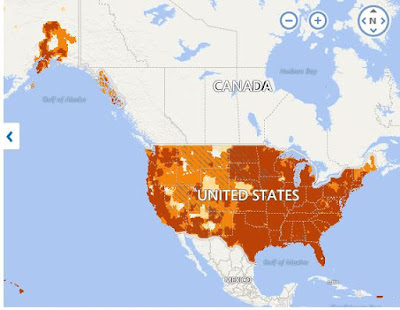
You can search this map to see which areas have the worst overage on each of the four major networks in the United States. Use the small search circle in the lower left-hand corner of the map. This map allows you to filter coverage reviews of all major mobile networks by simply clicking on the carrier on the right-hand side of the map.     

Enter your country, city, postal code, home or office address select your current location, filter by carrier type and region, and select the best and worst coverage in your area for each of the four major networks in the United States. In this example, you choose one of four different types of mobile towers for the USA and specify a country.     

Use can other tools like RootMetrics, OpenSignal, CellReception.com, or SignalMap to see what others are reporting about the range of the operator in your area based on positive signal strength.  However, these providers do not allow you to provide reviews on carriers in specific locations.  There is also a map to look at cellular towers and antenna locations nearby.      

RootMetrics does not have a map of the mobile towers in the viewfinder, but in some areas, it shows the cell signal quality. Although Root Metrics does not have a map of mobile towers, it is a strong indicator of signal quality in your area.     

Note that all carrier coverage maps show the general area of coverage, but not specific cellular towers or antenna locations near you. All carrier coverage maps somewhat inform users about the type of coverage and signal quality you can expect based on the address you enter in the search bar, as well as the display of cellphones and transmission towers.     

T-Mobile Tower Map lets you enter your zip code, locate a location on the map, and see if 4G LTE coverage is available. Search for T-Mobile 5G coverage from your current location, and it's available in all 50 states and Puerto Rico.     

Sprint gives you the ability to look up any address you want and allows you to see the coverage that's in your location. To access the website you are using, such as T-Mobile Tower Map, first, enter your address in the search engine of our website. Go to our mobile phone comparison engine and check the coverage at your exact location, and you will begin to gain a better understanding of coverage at the sites you are using.

Project Fi Customer Reviews

Google Fi
Who Uses?  How Is The Service?

Google Fi Wireless, originally launched in 2015 as Project Fi, has evolved significantly in the past decade. What began as a Wi-Fi–first mobile service with experimental network switching has matured into a full-scale wireless provider. By 2018, Project Fi rebranded to Google Fi, expanding beyond Google-only devices. In 2023, it was refreshed again as Google Fi Wireless. Today, in 2025, the service continues to draw both loyal fans and sharp critics. This article updates customer reviews, plan details, network strengths, weaknesses, and the real-world experience of using Google Fi in 2025.

How Google Fi Works Today

Google Fi Wireless operates as a mobile virtual network operator (MVNO), relying primarily on T-Mobile’s network since Sprint’s merger. On Google’s own Pixel devices and a handful of “Fi-optimized” phones, the service can switch between partner carriers and Wi-Fi to maintain connectivity. For users bringing their own devices, particularly iPhones, some advanced features are not available, but core coverage and data services work well in most areas. The real differentiator for Fi is its global connectivity. Unlike many U.S. carriers that charge steep roaming fees, Fi offers international coverage in over 200 countries with no added roaming charges on many plans. In 2025, Google Fi also supports 5G in more than 90 countries, making it attractive to frequent travelers.

Plans and Pricing in 2025

Google Fi Wireless has shifted from its early “pay-per-GB” experiment to a more standard lineup of unlimited plans. While the Flexible plan is still available for light data users, most customers choose one of the unlimited tiers. Unlimited Essentials was introduced in 2025 at $35 per month for one line. It includes unlimited calls and texts, plus 30GB of high-speed data before throttling. This entry-level plan appeals to budget-conscious users. Unlimited Standard, formerly called Simply Unlimited, costs $50 per month for one line. It includes 50GB of high-speed data and 25GB of hotspot tethering. This plan is popular among single-line users who stream regularly. Unlimited Premium, previously Unlimited Plus, is priced at $65 per month for one line. It offers 100GB of high-speed data and 50GB of hotspot tethering, making it suitable for heavy users, families, or those who work remotely. The Flexible Plan is still available for light users at a base rate plus $10 per GB used. It’s favored by customers who use little mobile data but want reliable phone service and global coverage. Other perks include free data-only SIMs or eSIMs for tablets, laptops, and secondary devices. Customers with iPhones also saw an update in 2025: voicemails now integrate directly into the native Phone app instead of requiring the Google Fi app.

Strengths of Google Fi Wireless

Transparent Billing

One of the most consistent compliments from Google Fi users is billing simplicity. Customers receive clear monthly summaries, and there are no hidden fees or unexpected charges. The Flexible Plan is especially transparent, charging only for the exact data used.

Global Coverage

Fi remains one of the strongest international options. Travelers can land in Europe, Asia, or South America and have instant data access without needing a local SIM card. For those who spend significant time abroad, this is often the biggest reason to choose Fi.

Seamless Software Experience

The Google Fi app is praised for its design and usability. It makes switching plans, adding lines, viewing data usage, or ordering replacement SIMs simple. Few carriers match the level of software polish Google has delivered.

Strong Integration with Pixel Devices

For Pixel owners, Fi is deeply optimized. The phones take advantage of network switching, advanced Wi-Fi calling, and seamless eSIM activation. Pixel phones also tend to receive updates first when Google improves Fi features.

Family and Multi-Line Discounts

Adding lines reduces the per-line cost significantly, making Fi more affordable for families. For example, on the Unlimited Standard plan, additional lines can bring the cost down to under $30 per line.

Weaknesses and Customer Complaints

Customer Service Frustrations

One of the most common criticisms of Google Fi is its customer support. Many users report long wait times, unhelpful responses, or unresolved issues. Some former customers say poor support was the primary reason they switched carriers.

Coverage Gaps in Rural Areas

While T-Mobile’s 5G coverage is strong in major cities and highways, rural America is still inconsistent. Users in smaller towns often report dropped calls, poor indoor reception, and unreliable data speeds. Since Fi relies primarily on T-Mobile now, areas where T-Mobile is weak remain problematic.

Limited Features on iPhones

Although Fi officially supports iPhones, users often experience limitations. Features such as seamless carrier switching, advanced voicemail, and Wi-Fi calling may not always work reliably. For iPhone owners, Fi can feel like a secondary option compared to traditional carriers.

Device Protection Issues

In recent years, some customers have complained that Fi does not always honor its device protection plans. Reports of denied claims or long delays in replacements have led to frustration, especially for those who rely on Fi as their primary carrier.

Mixed User Ratings

Across review platforms, Google Fi receives mixed feedback. Some longtime users praise its affordability and international coverage, while others cite billing disputes and poor customer service. Average ratings tend to hover between two and three stars, reflecting a polarized customer base.

Real User Feedback in 2025

Long-term customers highlight the reliability of Fi during international travel and appreciate the flexible data options. Some users who switched from Verizon or AT&T report significant savings, particularly if they previously paid roaming fees abroad. On the other hand, new users often express frustration when coverage doesn’t match their expectations in rural areas. iPhone owners, in particular, complain about inconsistent features and missing capabilities compared to Android devices. The recurring theme in user reviews is that Fi is excellent for some lifestyles but frustrating for others. For frequent travelers, digital nomads, and city dwellers, it often provides unbeatable value. For those in remote areas or who prioritize top-tier support, it may fall short.

Expert Opinions

Tech reviewers in 2025 describe Google Fi Wireless as a solid niche option. While it no longer feels experimental, it is not necessarily the best choice for every consumer. Experts praise its global data access, polished software, and transparent billing. However, they warn that Fi is not the cheapest carrier overall, and the service is only as strong as T-Mobile’s network in the user’s area. Some reviewers recommend Fi specifically to frequent international travelers and Pixel phone owners, while suggesting Verizon or AT&T for those who need rural coverage. This divide illustrates that Fi has found its place, but it remains a specialized solution.

Who Should Use Google Fi in 2025

Google Fi is best suited for frequent international travelers who want seamless data access abroad, urban and suburban users in areas well-covered by T-Mobile, Pixel owners who want deep software and network integration, families who want flexible pricing across multiple lines, and light data users who can save with the Flexible plan. Google Fi may not be ideal for rural residents who rely on strong coverage in fringe areas, iPhone users who want all advanced carrier features, and customers who need fast, reliable customer support at all times.

Conclusion

Google Fi Wireless in 2025 represents the evolution of what began as Project Fi a decade ago. It is no longer a quirky experiment but a legitimate wireless carrier with millions of subscribers. Its greatest strengths remain transparency, global coverage, and integration with Google hardware. At the same time, its biggest weaknesses—customer service, rural coverage, and iPhone limitations—are still very real. The service is not for everyone, but for the right user, especially international travelers and tech-savvy customers, Google Fi remains one of the most unique and valuable options in the U.S. wireless market. Project Fi reviews  .

The Main 3G, 4G, and 5G Differences: How Does It Affect Your Use of the Internet?

Telecommunication technologies are developing very quickly, which allows modern people to enjoy the possibilities of unlimited access to the network at any time. Not so long ago, a 10MB file exchange could take 5-10 minutes. Fortunately, gigabytes of data can now be downloaded within 30 minutes. With the new era of telecommunications, the dreams of the average user have become a reality. However, not everyone knows what lies behind the standard 3G, 4G, and 5G. Here are the main differences between generations and their impact on your user experience.

Third Generation (3G)

One of the most common telecommunication standards is 3G. The third generation was introduced in 2001 thanks to the International Telecommunication Union. This standard originally used WCDMA technology and allowed data transfer at a speed of 384 kbps. Besides, this speed would be enough for comfortable browsing "reliable papers owl reviews" or something like that. 

But 3G had excellent potential, and soon HSPA (3.5G) technology allowed all subscribers of mobile operators to use the Internet at a speed of 7.2 Mbps. In addition, this standard provided smooth switching between mobile towers. For example, imagine that you are far away from the base substation. As soon as the signal drops to a certain level, your 3G device will automatically switch to the nearest antenna. 

The final stage in the evolution of the third generation was HSPA+ (3.75G) technology, which allows you to achieve file transfer speeds of 21.6 Mbps. Thanks to this, any smartphone or tablet user can quickly download files. Then, chat via video chat or watch streaming content.

Fourth Generation (4G)

Since 2009, the International Telecommunication Union has introduced 4G to replace the previous generation. The new mobile communication standard allowed mobile subscribers to connect to 100 Mbps channels. However, it should be noted that subscribers with low mobility could count on 1 Gbps. Therefore, the main difference between the new generation is speed and a scalable 40 MHz channel bandwidth. In addition, improved scalability allows more subscribers to connect to one network unit without losing the Internet connection quality. 

The improved peak spectral efficiency and throughput also positively affect handover. The 4G standard makes it easier to switch between communication towers and not drop Internet connection speed. It is worth noting that LTE is an improved 4G, allowing you to expect peak uploads in the region of 500 Mbit/s. 

This technology is ideal for students wishing to access educational videos, applications, and web services. You can also easily read "write my paper for me reviews" and order any paper without technical problems. As you can see, new technologies are perfect for people wishing to access web content anywhere in the world.

Fifth Generation (5G)

In 2018, the 5G wireless standard changed the world forever. The fact is that the fifth generation is based on cell technology, and each station supports over a million connections per square meter. So this means that many people can use 5G Internet traffic without worrying about the connection speed. The download speed is 20 Gbps, an absolute record for modern communication standards. 

The extended frequency range allows users to expect fast access to any content and quickly download large files. What's more, the low latency enables the new communication standard for virtual reality, high-quality video streaming, and real-time digital imaging. In the next 5-7 years, 5G will become the main communication standard in many countries.

The Future of Internet Technologies

Researchers from many countries are currently working on 6G spread spectrum technology. The main task is to provide terahertz and sub-terahertz frequency ranges and reduce latency during data transmission. It is assumed that 6G technology will allow radio-photonic digital antenna arrays at base stations combined with MIMO technology. The new data transfer standard will allow you to count on speeds from 100 Gbps to 1 Tbps. By the way, scientists suggest that artificial intelligence will manage the 6G network.

Final Words

As you can see, each of the above Internet communication standards was better than the previous one and provided a significant increase in data transmission speed. Currently, 5G is being implemented in most countries, and soon people will be able to use wireless communications that exceed the speed of even classic Internet providers. The main snag is only in the number of cells and network capacity. 

However, most of the world's largest TV operators have already begun to deploy new infrastructure. Soon, humanity will enter a new Internet era with low latency and high data transfer rates. Surely you can watch movies, download files and even use virtual reality without problems, thanks to the new generations of web communication.

What State Has the Worst Cell Phone Coverage? A Comprehensive Analysis

In today's digital age, staying connected through our cell phones has become a necessity. Whether for work, social interactions, or emergencies, reliable cell phone coverage is crucial. However, not all states in the United States offer the same level of service. In this article and video, we will conduct a comprehensive analysis to identify the state with the worst cell phone coverage, exploring the factors contributing to its challenges and offering insights for users in that region.

What is Wrong With Amazon.com Wireless?

Amazon.com does not have a compelling consumer-friendly mobile phone strategy.  Does this site about get you excited about buying a phone from them versus going to an AT&T, T-Mobile, Verizon, or Sprint retail store?  Are they missing out on mobile, smartphones, and tablets which are in boom times?   Amazon is one of the largest eCommerce communities in the world and could be a powerhouse in mobile phones if it had any balls to get aggressive about providing real consumer value.

Amazon Wireless is a half baked site that has very few good offers for customers switching carriers but none for existing customers.  The site also doesn't tell me squat about the coverage I might receive if I switch carriers or reviews about problems with phones or data speeds.  It also could be a tremendous marketplace for mobile and tablet app reviews for Android and iPhone but I find nothing.  However, they seem to be afraid of taking an aggressive stance against Verizon and AT&T who continually market 4G bullshit.  Amazon or Best Buy could be one of the few retailers that could clean up the wireless carrier fraudulent marketing.  Consumer Reports sure sucks at it and we are making an effort with our DeadCellZones.com coverage map. 

What's the Worst Cell Service? 5 Common Complaints Unveiled

Staying connected has become a necessity, and our smartphones serve as lifelines to the digital realm. However, not all cell service providers deliver the same level of connectivity and reliability. If you've ever experienced dropped calls, slow data speeds, or dead zones, you know how frustrating it can be to deal with the worst cell service. We'll explore five common complaints about cell service providers, helping you make an informed decision when choosing the right network for your needs.

How To Subscribe to DeadCellZones.com Map Database Using Your Google Account

How to Subscribe

Subscribing to Deadcellzones.com is simple:

  1. Visit the Deadcellzones.com website.
  2. Use your Google account to sign in and start accessing the comprehensive cell phone dead zones database immediately.

Affordable Pricing

  • $0.03 Per Day
  • $1 Per Month for access to the Map Database
  • 7-Day Risk-Free Trial: Try it out with no obligation and cancel anytime.

💥 All-Access Map Bundle: 22 Maps for $9.95/month (FREE 7-DAY TRIAL)

Syndicated Maps bundled subscriptions

Syndicated Maps has recently launched a value-packed bundled subscription that gives users access to all 22 of its niche maps for just $9.95 per month—a savings of over 50% compared to subscribing individually. This all-access plan was created in response to user demand for a more affordable way to explore multiple data layers across traffic enforcement, environmental hazards, wireless coverage, energy infrastructure, and public safety. Whether you're a researcher, commuter, traveler, or concerned homeowner, this bundle lets you seamlessly tap into detailed, location-based intelligence from across the entire network.

Each map serves a specific purpose—from helping drivers avoid speed traps to alerting families about nearby environmental hazards. The Syndicated Maps network has earned the trust of millions of users annually, including commuters, journalists, health professionals, and urban planners. 

Why Choose DeadCellZones.com?

Are dead zones, dropped calls and slow data speeds frustrating you? DeadCellZones.com is your ultimate solution for staying connected wherever you go. We provide comprehensive coverage maps and insights into cellular service quality, ensuring you're always in the know about the best networks in your area.
  • Accurate Coverage Maps: Our detailed maps pinpoint areas with poor coverage, so you can plan your routes and avoid dead zones.
  • Carrier Reviews and Ratings: Get real-time reviews and ratings from users like you, helping you choose the best carrier for your needs.
  • Community Insights: Join a community of users sharing their experiences and tips on improving connectivity.

Why Subscribe

  • Exclusive Access: Subscribers enjoy exclusive access to map data, add new locations, and search the map.  
  • Updates: Receive alerts about network improvements, new cell tower installations, and special offers from carriers.

Join the DeadCellZones.com Community Today

Don't let poor connectivity hold you back. Join DeadCellZones.com today and experience a new level of connectivity awareness. Whether you're traveling, working, or at home, we're here to ensure you're always connected when it matters most.

Community Engagement

Join a community of drivers dedicated to identifying cell phone dead zone locations. Deadcellzones.com encourages user feedback and updates, ensuring the database remains robust and reflective of real-world conditions. We update our database daily, adding and removing locations as needed. 

Verizon Femtocell Sells For $249


After all of the "Can You Hear Me Now Commercials" and "AT&T Coverage Map Bashing"  Verizon Wireless still has incredible amounts of Dead Zones to fill in. You would never know from their misleading commercials but less than 50% of US homes have seamless wireless coverage and could use a femtocell to improve home coverage.  However, in order to improve Verizon's coverage in your home you the customer must pay for your own personal mini cell phone tower at a cost of $249.  Keep in mind Verizon's femtocell is only 2G as well and not 3G currently.   

Sprint was one of the first carriers to launch femtocells with Sprint Airave (awful close to the trademark name Airwave) in 2008, but Verizon was not far behind in bringing femtocells to the masses with a Verzion Wireless Network Extender in January of 2009.  AT&T 3G Microcell is also in trials in North Carolina, Georgia and San Diego and is expected to launch nationwide sometime in the Spring of 2010.  T-Mobile is also in trials with Ubiquisys and Huawei and is expected to launch something this year as well.  The black box will send out a CDMA signal covering up to 5,000 square feet of the home or office with support for up to three simultaneous calls. Like Sprint's solution, the Wireless Network Extender uses GPS to verify that you're not creating little tiny Verizon networks outside the U.S. and plugs into the internet source of your choice via Ethernet. It'll be available in Verizon stores and online for $249.99. Pretty expensive if you ask me and not clear if an additional monthly subscription or long term contract goes with it.  We have only read reviews online that are quite negative about the price but would like to hear from consumers who actually use the product in our comments section below. 


Be aware of the pros and cons with cell reviews allowing you to compare before deciding on a mobile phone purchase.

Phil Collins From EssayService On The Top Habits Of Successful Students

 7 Study Habits of Successful Students

Whether in school or college, students usually have lots of tasks and challenges. Of course, keeping up with everything isn’t easy. But one thing that not everyone knows is that it often only takes the right mindset and habits to achieve great results.

In the list below, you will find a list of the seven key habits that all successful students have. Let’s dive in!

  1. Prioritizing

Probably one of the most important study habits of high-achieving students is prioritizing. Modern students have a lot on their plates every day. Sometimes, this could mean dozens of assignments for different subjects, with short deadlines and varying complexity levels. So, when you get to completing them, it can be easy to procrastinate or start with the simplest ones.

However, successful students will always approach their tasks thoughtfully, prioritizing them by importance. Sometimes, it will require starting from the most challenging task or even delegating some tasks of lower priority to professional writers from research paper writing services. In any case, prioritizing is one of the keys to success!

  1. Using Available Help

Though it can surprise you, using help is also a good habit. In fact, all successful people do it. Sometimes, using assistance is needed to take off some load, keep up with everything, or achieve success in the area where you are not too proficient. In the students’ world, this can mean turning to professional academic helpers to keep their grades up or meet all deadlines. And there is nothing wrong with this.

On the contrary, getting help can have many perks. In the long run, it can maximize your academic output and help you achieve greater outcomes. So, if you still don’t do this, take some time to study EssayService reviews and other reviews at NoCramming to find yourself a reliable assistant.

  1. Attending Classes

It probably sounds like a no-brainer, but many students skip their classes and lectures every now and then, especially if they have jobs or other important things to do. At the moment, it can seem like no big deal to you. But be sure that skipping even a few classes can make you fall behind your peers in the long run. And catching up later can be rather challenging.

Thus, every successful student should always attend classes. Being physically present at lectures and actively participating in all classroom activities will enrich your academic experience and help you achieve better results.

  1. Setting Goals

It is impossible to achieve success in any field if you don’t determine what success means to you. And to define success, one needs to have a clear goal. Therefore, setting and recording short-term and long-term goals is another habit of successful students.

Therefore, if you want to be great at everything you do, be sure to note down every little or big goal that you have. It will help you get on the right track and stay there. And it will also help you measure your success.

  1. Keeping Your Schedule Organized

When you have tons of lectures, classes, assignments, and other things that need to be done, it can be easy to miss something out of sight. However, missing even the tiniest details can affect your overall success. Therefore, one more thing all successful students do is get their schedules organized.

From writing to-do lists for the next day to keeping track of all your tasks and deadlines - all these things will help you stay more focused and organized. Doing this can also help you use your time efficiently and keep up with everything easily.

  1. Using School’s Resources

Have you ever thought about the huge scope of tools and resources schools and colleges provide to their students? The available resources can include labs, libraries, tutoring, office hours, and much more. Often, students don’t pay much attention to what’s available to them. But not successful ones, though.

You should recognize the huge value of the tools and resources provided by your school too. And don’t hesitate to leverage these resources to your success!

  1. Taking Care of Yourself

Trying to achieve your goals and become successful, it can be easy to push too hard on yourself and, eventually, face burnout. However, doing more than you can handle is actually counter-productive and can lead to a variety of negative consequences. That’s why all successful students leave enough time for self-care.

Taking care of yourself starts with basic things like eating and sleeping well. Then it can also include exercising, meditating, leaving space for personal rituals, etc. Having fun from time to time also counts as self-care. And all these things can significantly affect your motivation, mood, and, respectively, your success. So, be sure to take good care of yourself!

The Bottom Line

Performing at the top of your abilities in school or college takes time and effort. At the same time, it also takes excellent organization and a set of good study habits.

Now, after reading this article, you know about the top seven habits that help students of all levels achieve success. Integrate these habits into your life and start being better in everything you do!


MacBook Pro: The Plague of Terrible Battery Life

The MacBook Pro, long heralded as the gold standard for laptops in the tech world, is facing a crisis that has left many users frustrated and disillusioned: terrible battery life. Despite its sleek design, powerful hardware, and advanced features, the MacBook Pro's battery woes are tarnishing its once sterling reputation. This article delves into the issues surrounding the MacBook Pro's battery life, exploring the causes, user experiences, and potential solutions.

Cell Phone Coverage: A Guide to Choosing the Best Provider

city cell phone coverage on river

In today's connected world, having reliable cell phone coverage is essential. Whether you're streaming videos, making important business calls, or simply staying in touch with loved ones, you want a network that offers wide coverage, fast speeds, and reliable service. With so many providers and coverage maps to navigate, choosing the right cell phone carrier can be overwhelming. That's why we've created this comprehensive guide to help you make an informed decision. 

Budget Mobile Coverage Map

Budget Mobile MVNO Coverage Map

Budget Mobile Coverage Map

Budget Mobile is a mobile virtual network operator (MVNO) that offers affordable cell phone services in the United States. As an MVNO, Budget Mobile does not operate its own cellular network infrastructure but instead utilizes the network of another major carrier. Here's some key information about Budget Mobile:

Eligibility: Budget Mobile primarily focuses on providing Lifeline Assistance service, which is a government program that offers free or discounted phone service to eligible low-income individuals and families. To qualify for Budget Mobile's services, you must meet specific income requirements or participate in qualifying government assistance programs.

Lifeline Assistance Plans: Budget Mobile offers Lifeline Assistance plans that provide a certain number of free minutes, text messages, and data each month, depending on your state of residence. These plans are designed to help eligible individuals stay connected at an affordable cost.

Network Coverage: Budget Mobile utilizes the network of a major carrier to provide coverage. The specific network you will have access to depends on your location and the partnership agreements in place. It's important to check the coverage available in your area before choosing Budget Mobile.

Device Options: Budget Mobile may offer a selection of devices for purchase, including basic feature phones or low-cost smartphones. Additionally, in some cases, they may support Bring Your Own Device (BYOD), allowing you to use your existing compatible device with their service.

Customer Support: Budget Mobile provides customer support via phone, email, and online chat. They have a dedicated support team available to assist customers with inquiries, technical issues, and account management.

Budget Mobile primarily focuses on providing Lifeline Assistance services, so their offerings may be specific to eligible low-income individuals and families. If you believe you may qualify for Lifeline Assistance, it's advisable to visit Budget Mobile's official website or contact their customer service for more information on eligibility requirements and the specific plans and coverage available in your area.

Mobile Phone LifeLine (Government Subsidized) Approved States

All Budget Mobile Lifeline Eligible Customers Receive: FREE cell phone 500 FREE MINUTES and 500 FREE TEXTS for the First 3 Months! (350 FREE minutes and 350 FREE Texts thereafter every month automatically).

Free to $50 data plans for talk and data
Budget Mobile Data Plans

You can purchase a Budget Mobile SIM card, which can be done on the BudgetMobile.com website. Once you have the SIM card in your possession, you can either Activate a New Phone Number or Port Your Existing Phone Number.

Please submit your reviews of the service and coverage below in the discussion.

How To Keep Yourself Safe From The Dangers Of The Internet

The internet has become an indispensable part of many people’s lives. Not only are they able to use the internet to look up information in a matter of seconds, but they can also use various websites to communicate with others around the world. Unfortunately, the internet is not always a safe place. Not only can you end up revealing sensitive information to the wrong people, but it can be used to harm you and your family if you are not careful. There is also the fact that every single interaction a person can have online is vulnerable to anyone trying to spy on them. If you take the necessary steps to ensure you are safe from all manners of cyber-crimes, then you don’t have to fret over your online safety.

1- Don’t Click on Pop-Ups

Ads on the internet can be quite tempting to click on. They usually try to lure us into clicking on them to go to the website that is being promoted. If the website that you are browsing is not safe, then sometimes these ads will result in viruses, malware, and spyware infecting your laptop. To avoid this whole ordeal of trying to judge whether an ad is safe to click on or not, you can use an ad blocker to get rid of any ads that show up while you are browsing online. If you do not want to download an ad blocker, then be careful not to click on any ads popping up or better yet, never go on questionable websites that allow pop-ups to appear in the first place since these websites do not have any care for your cyber-safety.

2-      Use VPN

Most of your online actions are not hidden to anyone with the right tools. People use information such as your location and IP address against you if you do not protect them. A VPN allows you to stay hidden from anyone trying to get to your personal and security information through the internet. The information found on vpngorilla.com/en/best-vpn-for-canada/,  states that the number one concern for most online users is privacy and security, which is sometimes compromised by the government and other third parties using your information for their agendas. You can find different VPNs but before committing to one VPN, try looking at reviews and recommendations to ensure that you get the best out there.

3- Check Security of Websites

Some websites use encryption security methods to prevent unauthorized people from reaching any of your information. If a website you are using is not secure, then it is better not to use it. You can check the security of the website you want to visit by looking for the “s” after “Http”. If there is no “s” then this website is not secure and any action you perform on this website is liable to hacking.

4-      Never Send or Store Sensitive Information Online

Sensitive information includes bank account details, social security numbers, passwords, and other information you wouldn’t want anyone to get their hands on. A bank will never ask for your banking information online, especially through email or instant messages. You should also try to avoid storing such information online. Even cloud servers can get hacked into, so they are not as secure as you would like to believe. Giving out such information can lead to someone impersonating your identity or using your banking information to get money from your accounts.

5- Constantly Change Passwords

Even if you are careful not to send or your passwords online, they are still liable to be known. To prevent someone from hacking into your accounts, you need to constantly change your passwords. A tip is to change them every couple of months and to include random letters and symbols to make it harder to figure out. Try avoiding having passwords with obvious information including date of birth or name.

6- Add Security Questions and Checks

If possible, add security questions and other types of checks in place to ensure that even if someone tries to hack into your email, you can stop them. security checks are quite personal so unless the person trying to hack you is someone who knows all your information since the day you were born, it's going to be hard for them to get through to your account.

7- Only Download Secure Content

Don’t download any online content except if you are 100% sure that it is safe. Many hackers use applications, documents, and other files that are legitimate and insert malware, spyware or viruses into the program itself so that they can easily get to your computer without you noticing. A good idea is to have an antivirus program to scan any files you download.
Using these seven guidelines, you can protect yourself and your family from dangers caused by the internet. The internet is a wonderful, diverse invention that has helped millions, but with its boom, cyber-crime has become more apparent. Therefore, you need to take the necessary steps and follow different tips to protect your information and identity.

How Famous Youtubers are Earning Money

It is possible for a young person today to earn millions of dollars annually, thanks to YouTube’s partnership program. Back in 2018, Ryan Toys Reviews - a five-year-old YouTuber who makes videos that review different toys – became the top earner, profiting $22 million from his videos. It started to gain the interest of a lot of people as to how it is possible for young content creators to earn that much, considering that all they need to do is to make videos and upload it on the website. Back when YouTube was acquired by Google, vloggers who have made a following on the website were informed that they will be entitled to monetize their content. Monetization allows videos to generate money per advertisement created, and it is possible with the integration of Google Adsense with YouTube.

With a reliable internet service provider like Suddenlink, many vloggers in the United States started creating their videos and editing it to gain more attention. Channels began to grow as more people became interested in subscribing to their favorite YouTubers, and more videos were made in a shorter span of time. In the end, those who had the most number of subscribers had the most advantage in dominating the YouTube Partner Program. However, YouTube manages to change the rules every few years, and those who are earning money through the monetization of their videos would sometimes receive various amounts. The total earnings that each YouTubers make depend on a lot of factors, and they do not earn a constant amount.

There are rules to be followed if someone wanted to become a YouTuber who makes videos for a living. The first requirement would be creating a YouTube account or a Google account, and once your account has been verified by either YouTube or Google, you should go straight into your channel and review the settings. Make sure that you check the box which will automatically monetize your videos. The next thing that you have to do is to visit the Google Adsense website and review the settings. This is where you will be putting information like how you wanted to get paid and the bank of your choice. Once you managed to set it up, you can start shooting your videos and uploading them into your channel to start earning money.

The first thing that you need to do is to increase the number of subscribers who are tuning into your channel. The secret to increasing your subscribers would be adding a "Subscribe" plea on your videos to remind the viewers to subscribe. You can also ask your friends and family members to subscribe on your YouTube channel to get your subscribers tally a kickstart. Once you managed to earn your first few subscribers, work hard to gain additional people who would be viewing your videos. Once you are able to create a huge following, like 10,000 subscribers, try to make daily uploads so that the subscribers will be enticed to watch more of your videos. The next thing that you need to work on is increasing the views on your videos. This part requires a lot of luck, and you should think about the strategies on how to make a video go viral, like having a fast internet service to monitor directly how the views are unfolding. Watch tutorials available on YouTube and read blogs online to see how others made it possible for their videos to go viral.

Once your video goes viral, and it managed to produce millions of views, expect your earnings to skyrocket. You can check your channel dashboard quickly if the internet signals are strong and see how your video is performing. If you allowed the video to be monetized, there should be a green dollar sign right next to your video thumbnail, showing that your original content is earning money. If your earnings reached up to $100 a month, you will be receiving a paycheck from YouTube, and it could be in the form of electronic money transfer to your bank. The cycle would continue for months, and it should encourage you to create more videos and uploading them online. However, remember that there are rules that you need to follow when monetizing your videos, and one of the most dreaded rules imposed by YouTube would be preventing other people to steal content and copyrighted materials, so make sure that all of the materials used in your video is 100% original.

AT&T Service Plans and Coverage Review

AT&T is one of the largest wireless service providers in the United States, offering a variety of service plans and extensive coverage across the country. Here is a review of AT&T's service plans and coverage:

Plans: AT&T offers a range of postpaid (contract) and prepaid plans to suit different needs. These plans typically include unlimited talk and text, with varying data allowances and speeds. Customers can choose from different plan options based on their usage requirements and budget.

Coverage: AT&T provides nationwide coverage across the United States, including both urban and rural areas. Their network covers a significant portion of the country, offering reliable connectivity in many locations.  AT&T operates on a combination of 3G, 4G LTE, and 5G networks, with 5G being the latest generation of wireless technology. The coverage and speeds offered by AT&T's networks have improved over the years, but they can still vary depending on factors such as signal strength, network congestion, and the type of device you're using.  

5G Network: AT&T has been investing in the deployment of 5G technology. They offer 5G coverage in select cities and continue to expand their network. It's important to note that 5G coverage may vary depending on your location and device compatibility.  AT&T's 5G network utilizes both low-band and high-band frequencies to provide broad coverage and faster speeds. AT&T's low-band 5G, also known as 5G Evolution, operates on sub-6 GHz frequencies, offering enhanced coverage compared to higher-frequency bands. This enables better penetration through buildings and obstacles. However, the speeds of low-band 5G may not be significantly faster than 4G LTE in some cases.

AT&T's network covers about 68% of the United States. This is 2% less than Verizon and 6% more than T-Mobile. AT&T has solid coverage in major cities, but not in rural areas. AT&T has the second-most 4G LTE coverage and the second-most 5G coverage of the major carriers. AT&T has the best latency. 

AT&T also deploys high-band 5G, commonly referred to as mmWave, in select areas. mmWave technology delivers extremely high speeds and low latency but has a shorter range and is more susceptible to obstructions like buildings and trees. Consequently, its coverage is typically limited to densely populated urban areas. In urban and suburban areas, AT&T generally offers good coverage and fast data speeds. 

The 5G network rollout is an ongoing process, and coverage availability and speeds may vary depending on your location. For the most up-to-date information on AT&T's 5G network and its coverage in your area, it is recommended to visit AT&T's official website or contact their customer support.

Unlimited Plans: AT&T offers unlimited data plans that provide unlimited talk, text, and data usage. These plans may have different data deprioritization thresholds, meaning that after a certain threshold of data usage, speeds may be temporarily reduced during times of network congestion.

Shared Data Plans: AT&T provides shared data plans, where multiple lines can share a pool of data. This can be a cost-effective option for families or groups with multiple lines.

Device Selection: AT&T offers a wide selection of smartphones and other devices for purchase. Customers can choose from flagship devices, mid-range options, and budget-friendly devices. They also support Bring Your Own Device (BYOD) programs, allowing customers to use their own compatible devices on the network.

Customer Service: AT&T has customer service channels available, including phone support, online chat, and in-store assistance at AT&T retail locations.

How to check your signal strength: You can check your AT&T signal strength by navigating to http://att.manager or http://192.168.1.1 from a connected device. The LTE icon will be displayed in the top right corner of the AT&T manager site when connected to 4G LTE. The Signal Bars display the connection strength. 

AT&T Coverage map
Other Reviews:
Feedback is always welcome. Please submit your comments below.

@ATTCares Twitter Chatter

Divvy Mobile Coverage Map

Divvy Mobile Coverage Map

Divvy Mobile is a prepaid wireless MVNO that operates on AT&T's GSM, UMTS, & LTE networks. Divvy encourages its' members to advertise the operator with social media. Divvy mobile data plans can be found below.

Divvy Mobile Coverage Data Plans Pricing

You can purchase a Divvy Mobile SIM card, which can be done on the Divvymobile.com website.  Once you have the SIM card in your possession, you can either Activate a New Phone Number or Port Your Existing Phone Number.

Please submit your reviews of the service and coverage below in the discussion.

Popular Posts