Showing posts with label Tablet. Show all posts

What Does The iPhone Battery Replacement Cost?

iphone battery replacement

The cost of replacing an iPhone battery can vary depending on the iPhone model, whether the device is covered by Apple's warranty or AppleCare+, and the country or region you are in. Here is some general information regarding iPhone battery replacement costs:

Out-of-Warranty Service: If your iPhone is no longer covered by the standard warranty or AppleCare+, and the battery needs replacement, you will likely have to pay for the service. The cost typically ranges from $49 to $69 for most iPhone models.

AppleCare+: If you have purchased AppleCare+ for your iPhone, it provides additional coverage for battery replacement. With AppleCare+, battery replacement is usually covered under the plan, and you will not have to pay an additional fee for the service.

Battery Replacement Program: In some cases, Apple may offer a battery replacement program for certain iPhone models if they determine that there is a specific battery-related issue. These programs are usually free of charge or offered at a discounted price. It's worth checking Apple's official website or contacting Apple Support to see if your iPhone model is eligible for any such program.

Third-Party Repair Services: There are also third-party repair services that offer iPhone battery replacements at varying prices. However, it's important to consider the reputation and reliability of these service providers, as using unauthorized or low-quality parts can affect the performance and safety of your iPhone.

It's recommended to check with Apple or an authorized Apple service provider to get accurate and up-to-date information about battery replacement costs specific to your iPhone model and location. Additionally, Apple's official support website provides details on battery service options and pricing based on your location.

5 Must Have Mobile Games

Mobile phone games have exploded over the past couple years thanks to the rise of the smartphone and tablets like the iPad. These days phone games aren't just Tetris and Pong, but more like an arcade in your pocket with sophisticated titles. With so many to choose from, it's sometimes hard to sift through the deluge and find that diamond in the rough. A prepaid cell phone doesn't have to be left out of the gaming fun, either. There are plenty of great free mobile games out there, which are ideal when you're on a prepaid or limited data plan. Whether you're on a budget or just like a good deal, here are 5 great free games available to get your T-mobile phone gaming today.

1. Words with Friends (Zynga) - The latest sensation from Zynga (the studio which brought you Farmville), this game can be played with Facebook friends, a random online opponent, or between you and another friend live. It's essentially Scrabble with a few tweaks, but as a free game it can't be beat for linguaphiles everywhere.

2. Zynga Poker (Zynga) - Zynga Poker is the largest free-to-play online poker game in the world. Players can choose from casual Hold ‘Em tables, tournament play or VIP tables.  According to AppData, it is the fourth most popular game on Facebook, four years after its launch. Also available on Google Android and Apple iOS, Zynga Poker has been a top 10 grossing game in the Apple App Store.  If you are interested in real online gambling see these top 5 mobile casino games.

3. Madden NFL 10 (EA Mobile) - The classic football sim comes to your phone with this game free for T-Mobile Android phone users. This includes all 32 NFL teams and 300 plays to choose from, it's a full gaming experience. The latest edition, Madden NFL 12, can be had for only $6.99.

4. Angry Birds (Rovio Mobile Ltd.) - Free for most Android phones and iPhones, no list would be complete without this titan of the mobile gaming industry. It's popular for good reason, too. Tight physics puzzle game-play is paired up with a whimsical design and simple controls to make this an addictive game perfect for he mobile platform.  Its a perfect game for the youngest of kids to learn the basics of using an iPad or touch tablet computer.
5.  Tomb Raider – This mobile slot game is based on the popular Tomb Raider game. What we were first able to play on computers and later to see on movies, can now be played on your mobile with chance to win some big money! Enjoy this 5-reel game's graphics and sounds on the Platinum Play or Roxy Palace Casino. Get ready to see Lara Croft on your mobile and maybe even win the $56,250 available jackpot. Once you’re done with this themed slot game, then see this great page for a list of other mobile slots games, just pick the one you like the most!

AT&T & Verizon Shared Data Plans Compared

Comparing AT&T & Verizon Buckets of Data for Multiple Devices

AT&T requires customers to have at least one smartphone on a plan. Data bucket pricing is staggered at $40 for 1 gigabyte; $70 for 4 GB; $90 for 6 GB; $120 for 10 GB; $160 for 15 GB; and $200 for 20 GB. Adding a required smartphone runs $45 per device on the 1 GB plan; $40 on the 4 GB plan; $35 on the 6 GB plan; and $30 on the remaining plans. “Basic” and “messaging” devices, or those that are not considered smartphones, runs $30 per device; laptops, mobile hotspots, and wireless modems run $20 per device; and tablets and gaming devices run $10 per device.  AT&T includes access to 30,000 wifi hotspot locations with a plan like this.

In comparison, Verizon Wireless charges $50 per month for 1 GB of data; $60 for 2 GB; $70 for 4 GB; $80 for 6 GB; $90 for 8 GB; and $100 for 10 GB. For customers needing more, the carrier charges $10 for each additional 2 GB. Device pricing is at $40 for each smartphone; $30 for each “basic” phone; $20 for each wireless modem or hotspot device; and $10 per tablet.

Both carriers charge $15 per GB for data usage over the plan.  Both carriers also do not distinguish between 3G and LTE data received.  Slow or fast the pricing is exactly the same.

This still begs the question about why tethering costs are so high?  Tethering is still the easiest option if you have one 4G LTE device and it's very easy to do when you create a wifi hotspot.  This option is still the easiest and cheapest if you have T-Mobile. 

How To Use iPad or Phone as Boarding Pass

Paperless Boarding Pass on iPhone Wallet
Save a tree and the hassle of printing a boarding pass.  A paperless boarding pass enables airline passengers to download their boarding pass on their cell phones or personal digital assistants (PDAs). This innovative approach streamlines the customer experience while heightening the ability to detect fraudulent boarding passes. Each paperless boarding pass is displayed as an encrypted two-dimensional bar code along with passenger and flight information. TSA security officers use scanners to validate the authenticity of the boarding pass at the checkpoint.

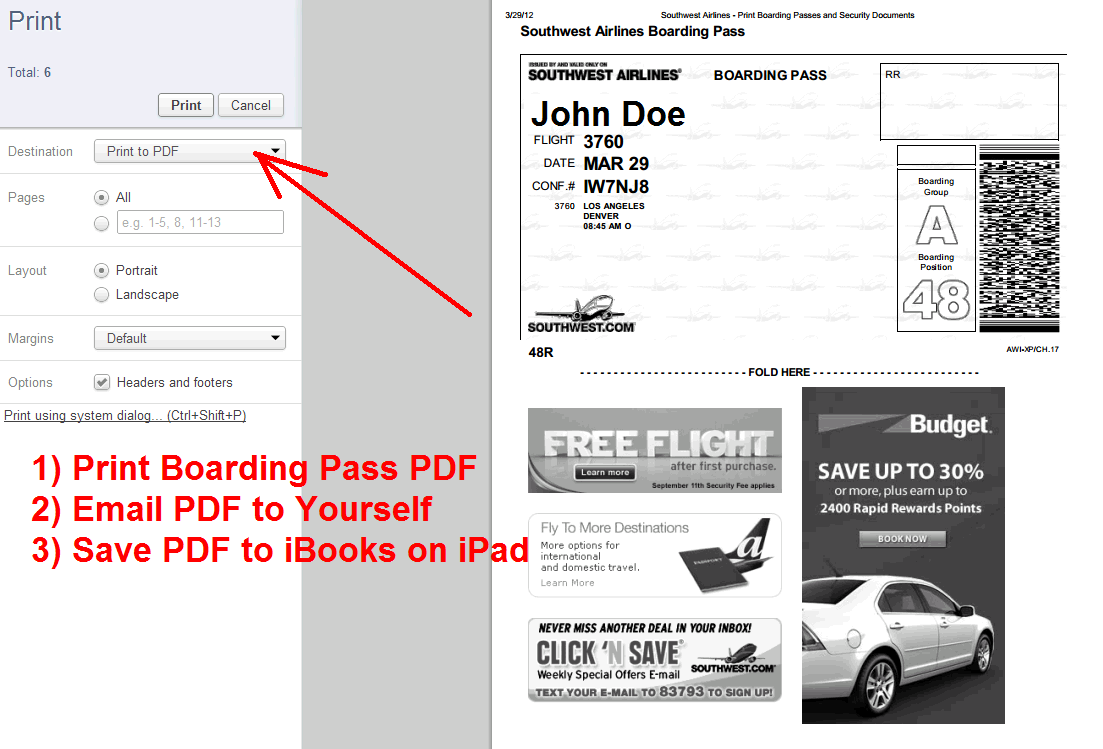
Airlines will make this option available when passengers choose their method of boarding pass delivery.  Here is an example of using the boarding pass on an iPhone.  The 2nd example is how to save your boarding pass as a PDF file by printing it.  Then email the PDF to yourself and save it to your iPad, iPhone, Android Phone or tablet device.  It is important that you download and save the document prior to arriving at the airport.  You don't want to mess with trying to download the document at the airport if the network is congested.
Save Boarding Pass as PDF File

iPhone Boarding Pass

iPad Boarding Pass
 

What Android Version Do I Have?

How do you determine which Android operating system you have on your smartphone or tablet?  It is pretty easy to do, by simply clicking on Settings / About Phone.  Scroll down and look for "Android version" and there will be 3 numbers.  For example, my G2 T-Mobile smartphone has "Android 2.3.4", which would be Android Gingerbread.  The Android version code names are in alphabetical order with the most recent release being Ice Cream Sandwhich 10.3 v4.0.3 as of CES 2012.   (See versions below)

Android Ice Cream Sandwich
10.1 v4.0.1
10.2 v4.0.2
10.3 v4.0.3

Android Honeycomb
9.1 v3.0
9.2 v3.1
9.3 v3.2
9.4 v3.2.1
9.5 v3.2.2
Android Gingerbread
8.1 v2.3
8.2 v2.3.3
8.3 v2.3.4 
8.4 v2.3.5
8.5 v2.3.6
8.6 v2.3.7
Android Froyo
7.1 v2.2
7.2 v2.2.1
7.3 v2.2.2
7.4 v2.2.3

Android Eclair
6.1 v2.0
6.2 v2.0.1
6.3 v2.1

Android Donut
5 v1.6

Android Cupcake
4 1.5

Android Astro 
3 v1.1

Android Bender 
2 v1.0

Android Alpha
1

Android is a mobile operating system developed by Google used for developers of smartphones, tablets and netbooks.  Every carrier today including AT&T, Verizon, Sprint and T-Mobile use some derivative of the operating system on their Android phones.  Unfortunately, the complexity of Android versions on the market has made marketing the phones confusing to many consumers.  Unlike Apple which has a closed development platform, Google has an open development platform that allows bleeding edge developers and manufacturers to stretch the limits of the software.

Carriers are typically several versions behind rolling out the new features of the system.  If you are wondering what new features have been added in the new Android version see this link of Android version features.  It can often take up to a year or more of testing before the new versions are automatically downloaded and upgraded into phones.  You can also check under System Updates under settings to see if you have any updates available.  


Free 3G Amazon Kindle Fire Android Tablet?

Amazon Kindle Fire with Android OS is Coming for $199 


Amazon announced today a WiFi only 7 inch Android tablet that it will sell for $199.  However, will Amazon's next version of the Fire have free 3G wireless?  Amazon allows customers who have the black and white Kindle to access AT&T 3G for free.   The next Amazon Fire could have free AT&T 3G for $299 similar to the black and white Kindle for $79.  The current WiFi only Fire tablet has a 7 inch screen and weights only 14.6 ounces.  The Amazon does not include 3G and you can pre-order it for $199.  Shipping date is November 15, 2011.

This is a tremendous breakthrough for the industry where the device itself becomes a commodity and the services behind the device become the real value.  Subscriptions to content like Pandora, Netflix or Amazon movie become more important and thus will allow Amazon to subsidize the price of the device.

It remains to be seen if newspapers can get into the game of require subscriptions to view their content.  My speculations is they won't have much success getting people to pay for news and simply will have apps build in this Android platform that are filled with ads.

If you compare this device to the iPad 2 its $300 cheaper and does not have the following features.  Camera and GPS which are unnecessary for most tablet users.  Tablet users are primarily inside the home and office and only need WiFi.   Also, if you are a savvy user and have figured out how to tether WiFi devices to your 4G smartphone than the WiFi only version will also be sufficient.  

10 Reasons Why the Motorola Xoom Tablet is Better Than the iPad

Motorola Xoom vs iPad 2
Firstly, I am a proud owner of an iPad but also a heavy Google Apps users so I have been suffering a bit for the last year with the lack of multi-tasking and lack of app integration.  I will most certainly be purchasing this tablet in the near future but will not be buying the 3G or 4G version.  WiFi only tablets or iPads work just fine, especially when you tether a tablet to a 4G phone to save money paying for an extra data plan that is not needed. Here are 10 Reasons why the Motorola Xoom Tablet is the best tablet on the market and better than the iPad and likely the iPad 2.

1) First Android operating system Honeycomb 3.0 design specifically for tablets
2) Front facing web cam with Google Talk integrated
3) HD video capture
4) 5MP camera
5) 3G upgradeable to 4G & Verizon launching in Q1 2011
6) Dual core processor for multi-tasking and speed
7) 10.1 Inch HD display
8) Adobe Flash Player 10.1 videos play inside the browser
9) Scrollable widgets on the home screen for easier multiple tab browsing
10) It won the CES Best in Show 2011

The only questions I have are the following:  #1 What is the battery life like?  #2 Are any Android apps available in the marketplace ready for the tablet form factor?  Will it be available in the WiFi only version?  Will Best Buy or Amazon sell it?  Will the price point be $500 or less for the WiFi only version? 


Must Have Consumer Electronics for 2011

  • Survey Conducted by SmartBrief.com

    What will be the must-have electronics in 2011?
    Tablet 46.42%
    Streaming video box or app 19.89%
    Smartphone 10.88%
    Not sure 10.08%
    3DTV 9.02%
    E-reader 3.71%


    • Primary reason for to connecting device to WiFi or 4G?
      find exact content 41.47%
      no more wires in living room 20.74%
      cheap content 18.89%
      its new 14.75%

    Free 3G on Kindle & Nook Ebook Readers

    No AT&T Monthly Data Plans Required
    Its actually worthing paying a little extra for the Kindle 3G or Nook 3G when the Kindle WiFi & Nook WiFi are priced about $50 less than the 3G. The Kindle & Nook 3G (Free 3G + Wi-Fi) is the easiest option because there is no wireless monthly data plan fee from AT&T to use their 3G network.  Each ebook reader has a built-in free 3G connectivity which uses the same cell phone towers & there are no monthly fees or commitments. Amazon & Barnes & Noble subsidizes AT&T's 3G service while you are traveling and you can also use your WiFi at home and don't have a 3G signal. 3G enables you to download books anytime without having to find a Wi-Fi hotspot connection. With wireless coverage in over 100 countries and territories, Kindle 3G is a great option for travelers.

    Cheapest WiFi Only Android Tablets

    The definition of a tablet computer usually means no physical keyboard and the screen is seven inches or larger. Contrary to public opinion the iPad was no the first tablet on the market and there were many manufacturers like Archos, Nokia, Motorola, Zenithink, Augen, iRobot, Maylong, Plexon who were making them long before. However, Apple has educated the consumer masses that tablet computers are awesome and has provided the fuel for buyers. However, their closed system does not allow you to watch Flash video and thus would prevent you from watching YouTube and many other web sites. We decided to put a list of Android tablets together and surpassingly came up with 9 tablets available at Amazon.com. If you simply want a device to browse the internet and play Android games purchase one of these devices for $100-$400 and save a bunch of money. If you are like many of us and don't use your data plans enough outside the home or office to pay for a 3G or 4G data plan that Wi-Fi only should be sufficient.

    Popular Posts